When Remembite asks you to confirm a number
Your AI works out the numbers. Before saving, Remembite compares them with USDA-based reference data and with each other. If a number looks off, nothing is saved yet and Claude asks you about it.
What you see
- You log a meal.
- Claude replies with a question instead of "saved". For example, it names the food and asks whether the calories are right.
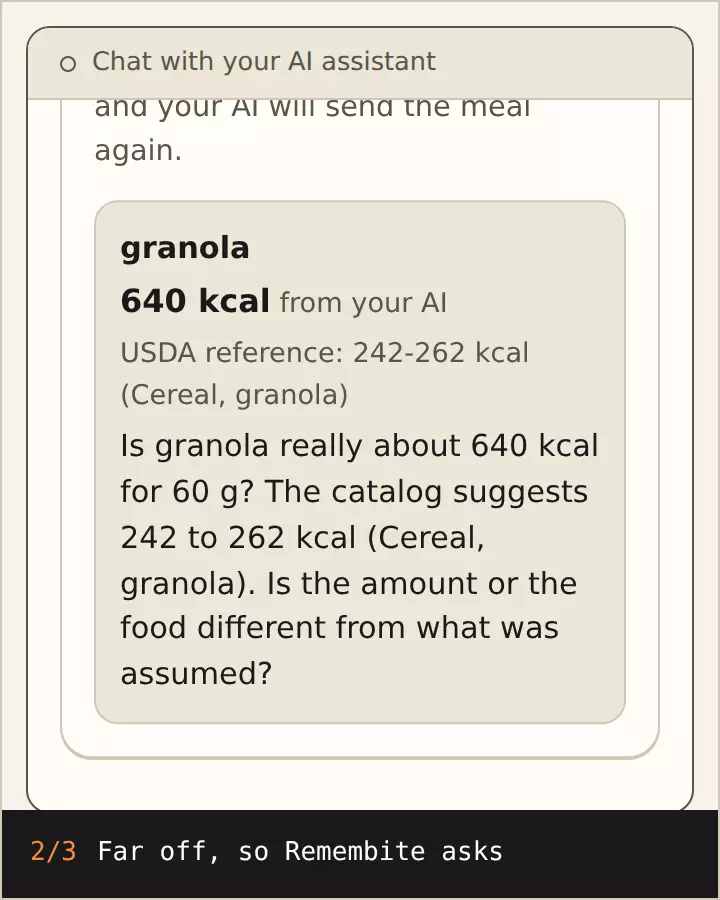
Illustration, sample data 640 kcal for 60 g of granola is held back and your AI asks you. After your answer it is saved at 252 kcal. Numbers from real Remembite results. - You answer in the chat:
- Confirm: "Yes, that is right." Claude sends the same numbers again, marked as confirmed, and Remembite saves them.
- Fix: "It was 150 g, not 300 g." Claude sends corrected numbers.
What Remembite compares
- Each food it can confidently match, against a USDA-based reference.
- Protein, carbs and fat of each food, against its calories.
A food with no close reference is saved as an AI estimate, with only the second comparison.
How it shows in the app
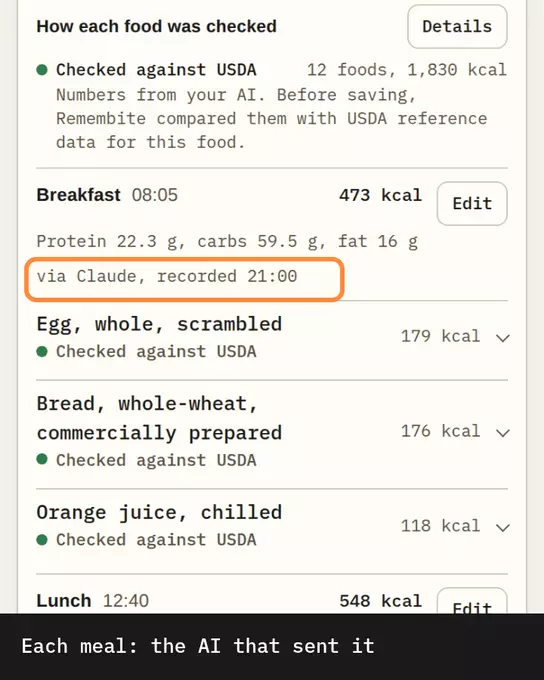
On Today, How each food was checked lists a label for every food:
| Label | Meaning |
|---|---|
| Checked against USDA | Compared with USDA reference data before saving |
| You confirmed | Looked different from the reference and you confirmed it |
| AI estimate | No close USDA reference, so only protein, carbs and fat were compared with the calories |
| From USDA data, Logged before checks | Older meals, saved before AI numbers |
Good to know
- A question does not mean the number is wrong. It means it differs from the reference.
- These are estimates. The portion is the biggest source of error.
- You can also meet this check when you edit a meal in the app: see Edit or delete a meal.
Start your own record
Create a free account with your email, then add Remembite to Claude. Want to look first? Watch Claude log a sample day, no account needed.