How to Log Meals With Claude and Keep the Numbers
Yes, you can log meals with Claude by describing what you ate. Claude estimates the calories, protein, carbs and fat in the chat, but a chat does not keep a log you can total or chart. A custom connector fixes that: Remembite stores each meal Claude sends and shows the totals. This guide covers what Claude does alone, how the connector works, what happens on each message, and what to try when something fails.
Key takeaways
- Claude can estimate a meal in a normal chat, with no setup.
- Without a store, those numbers stay in the conversation. Nothing builds a per-meal log you can total or chart.
- With Remembite connected, Claude does the math and Remembite saves each meal, charts the trend and answers "how did my week look?".
- If a number looks far off, Remembite does not save it. It sends a question back to Claude, which asks you to confirm or fix it.
- Remembite exposes 23 tools to Claude. You never call them by name; you talk as you normally would.
- Remembite is free to start and open to anyone with an account.
Short answer: Claude alone, and with a connector
Claude can read "2 eggs and 150 g rice for breakfast" and reply with an estimate. For one meal that is often enough. The gap shows up on day two, when you want the week, a corrected portion or yesterday's breakfast again.
Claude has a memory feature, but its memory help page describes it as a set of topics you can read and edit under Settings > Memory. It does not describe a per-meal record with running totals. A custom connector adds that record. Claude calls Remembite, Remembite saves the meal, and later questions are answered from saved meals instead of from scrolling back through chats.
One more reason to keep numbers somewhere fixed: estimates move with the information given. In a 2025 study of ChatGPT-5 on food images of 195 dishes, accuracy improved when descriptors and ingredient lists were added to the prompt. The same meal described two ways can therefore get two numbers. The research is covered in can ChatGPT or Claude track calories.
Claude alone vs Claude with Remembite
The figure and the table compare what survives after the chat ends. Claude's column follows its memory and export help pages. Remembite's column follows the features page and the tool registry.
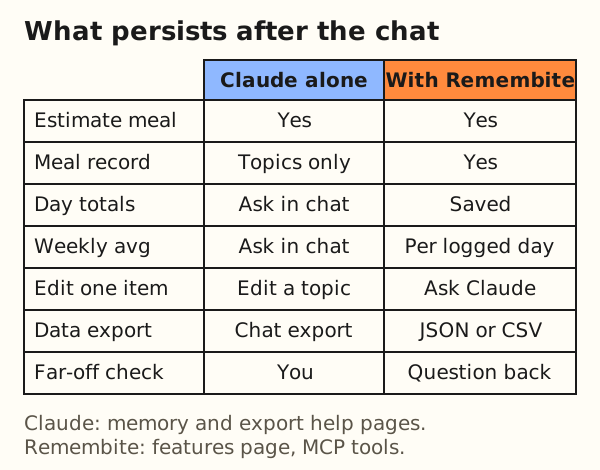
| Need | Claude alone | Claude with Remembite |
|---|---|---|
| Estimate a meal | Yes, in the chat | Yes, Claude still does the math |
| Keep each meal | Memory topics you can read and edit | One saved record per meal |
| Day totals | Ask Claude to add them again | Read from the saved meals |
| Weekly average | Ask Claude to add them again | Average per logged day, days logged, five most logged foods |
| Change one item | Edit a memory topic or re-ask | Ask Claude to replace the item |
| Export | Claude export of chats and account data | JSON or CSV of your meals from Account |
| Check a far-off number | You check it yourself | Not saved until you confirm or fix it |
Remembite does not replace Claude's numbers with its own. It stores what Claude sends and labels how each food was checked. The export route is covered in export your food log.
What a custom connector and MCP are
MCP stands for Model Context Protocol. The MCP introduction calls it "an open-source standard for connecting AI applications to external systems" and compares it to a USB-C port: one standard plug instead of a custom cable for each device. Claude's help describes MCP as an open standard created by Anthropic.
A remote MCP server is a program hosted on the internet that an AI app can talk to. Claude calls the way you add one a custom connector. Remembite's server lives at one address, https://remembite.com/mcp, and offers a list of tools. A tool is a named action with a short description and typed inputs, such as "save this meal" or "read this day". Claude reads the list, decides which tool fits your message and calls it.
Sign-in and trust
Adding a connector usually includes an OAuth sign-in. The MCP authorization specification states that authorization is optional, and that servers using it over HTTP should follow a flow based on OAuth 2.1, with the MCP server acting as the resource server that checks access tokens. For you this shows up as a browser step: sign in to Remembite, agree to the consent, return to Claude.
Claude's help gives a caution that applies to every connector, ours included: connect only to servers built and hosted by organizations you trust, and review the permissions a connector requests. Read what Remembite asks for on the consent screen and in the privacy notice before you agree.
The 23 tools
The registry in the Remembite server lists 23 tools. The figure groups them by job and the table gives a one-line description of each, paraphrased from the tool descriptions in the code. Tool names are an implementation detail and can change. You never type them.
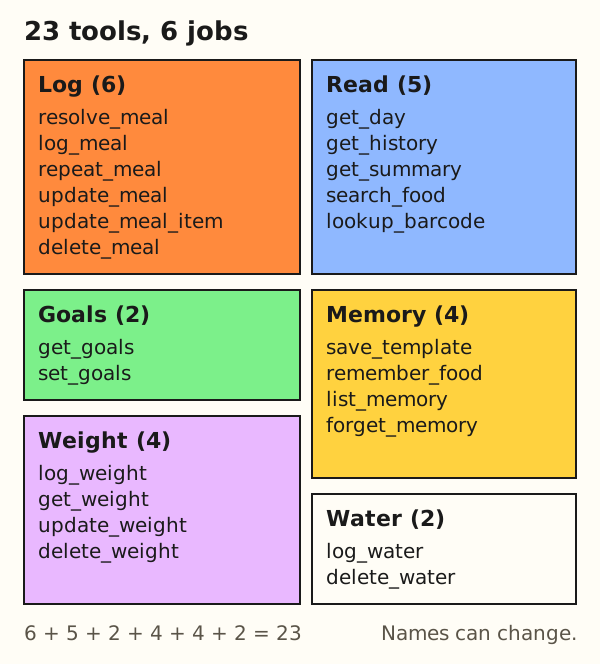
| Group | Tool | What it does |
|---|---|---|
| Log | resolve_meal | Optional lookup: USDA-based reference values and clarifying questions. Saves nothing. |
| Log | log_meal | Saves a meal with the numbers Claude sends, after the check. |
| Log | repeat_meal | Copies an earlier meal, a template or the latest meal of a type, with optional edits. |
| Log | update_meal | Changes a saved meal in one step: its time or type, foods added or removed, or single fields of a food. Unsent fields stay as stored. Foods that are added or changed get the same check. |
| Log | update_meal_item | Replaces one item of a saved meal, after the same check. |
| Log | delete_meal | Permanently deletes one saved meal, its items and its photos. |
| Read | get_day | Meals and totals for one date, plus the water logged and the goal in effect. |
| Read | get_history | Saved meals by date over at most 31 days, with per-day totals and per-day water totals. |
| Read | get_summary | Average per logged day over at most 92 days, days within 10 percent of the goal, top five foods. |
| Read | search_food | Looks up foods in the catalog with values per 100 g and common portions. |
| Read | lookup_barcode | Looks up a packaged product by barcode in Open Food Facts and returns crowd-sourced reference values per 100 g and per serving. Check the label. Saves nothing. |
| Goals | get_goals | Returns the goals in effect on a date. |
| Goals | set_goals | Sets calories, protein, carbs, fat or water goals from a date onward. |
| Memory | save_template | Saves a meal as a named template such as "my usual breakfast". |
| Memory | remember_food | Saves what a phrase means to you, such as "my oats". |
| Memory | list_memory | Lists saved templates and personal phrases. |
| Memory | forget_memory | Permanently deletes one phrase or template. Logged meals stay. |
| Water | log_water | Saves one drink of plain water in ml, l, fl oz or cups. Drinks with calories go in as meals. |
| Water | delete_water | Permanently deletes one saved water entry. |
| Weight | log_weight | Saves one body weight reading in kg or lb. Needs the updated health data notice to be accepted first. |
| Weight | get_weight | Returns readings for up to 366 days, the change since about a week earlier, 7, 14 and 30-day averages and the goal weight if one is set. |
| Weight | update_weight | Changes the weight or the time of one saved reading. |
| Weight | delete_weight | Permanently deletes one saved weight reading. |
The split matters for trust. Five of the six log tools write, and so do set_goals, three memory tools, both water tools and three of the four weight tools. The read tools only return data. Claude's help also lets you turn tools off for a conversation from its "Search and tools" menu.
What happens when you say a meal
Take the message "2 eggs and 150 g rice for breakfast". The diagram shows the path.
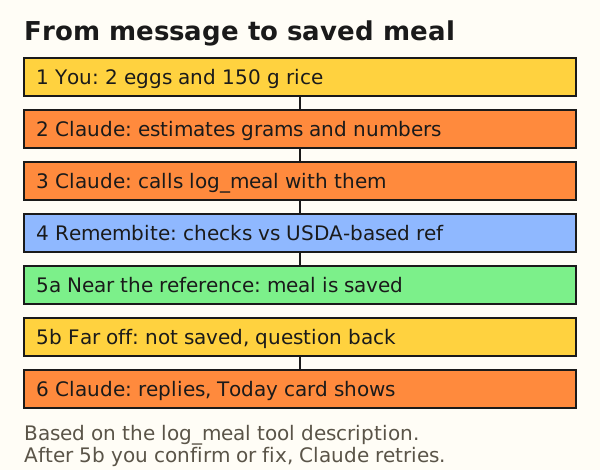
- You write the meal. Plain words are enough. Grams help.
- Claude estimates. It picks the grams for each food and works out kcal, protein, carbs and fat for the whole portion. Remembite does not do this step.
- Claude calls
log_meal. The tool description tells Claude that the values it sends are the values saved. - Remembite checks. For each food it can confidently match to a USDA-based reference, it compares Claude's calories with that reference. For every food it also checks that protein, carbs and fat do not add up to more energy than the calories sent allow.
- Near the reference: the meal is saved. Far off: nothing is saved, and Remembite returns a question per item for Claude to ask you.
- Claude answers. Where your app supports it, a Today card shows the day's total, goal progress and meals.
Here is the arithmetic behind a typical reference for this meal. The values come from USDA FoodData Central, SR Legacy data type, read from the 2018 data download kept in the Remembite repository.
Worked example: 2 large eggs (hard-boiled) and 150 g cooked white rice.
- Eggs: FDC 173424 lists a large egg as 50 g, so 2 eggs weigh
2 x 50 g = 100 g, and100 g x 155 kcal / 100 g = 155 kcal - Rice: FDC 168878 gives 130 kcal per 100 g, so
150 g x 130 kcal / 100 g = 195 kcal - Total:
155 + 195 = 350 kcal - Macros: protein
12.58 + 2.69 x 1.5 = 16.6 g, carbs1.12 + 28.17 x 1.5 = 43.4 g, fat10.61 + 0.28 x 1.5 = 11.0 g - Energy from macros:
4 x 16.6 + 4 x 43.4 + 9 x 11.0 = 339 kcal
The macros give 339 kcal against 350 kcal sent, a small gap that raises no question. Claude's own numbers may differ from these, because it chooses the grams and the data it uses.
The gap is expected. The 4-4-9 factors are an approximation, and the full method is in the blog post on checking AI calorie estimates. For the longer path, including every case the check can take, see how Remembite works.
Connect in three steps
This is the short version. The exact steps, including Team and Enterprise setup, stay on the how to connect page, so they are not copied here.
- Create a free account at remembite.com/login.
- Add the connector. In Claude, open Customize > Connectors, choose + Add, then Add custom connector, and enter
https://remembite.com/mcp. - Sign in and agree. Remembite emails a one-time link, then shows a health data consent. Agree, and ask Claude about a meal.
Steps may change. Claude's help page for custom connectors with remote MCP is the source for Claude's own menus, read on 2026-10-16.
What is sent and what is stored
Data moves in two directions.
From Claude to Remembite
For each item, Claude sends the words you used, the grams, and kcal, protein, carbs and fat. It may add fiber, sugar, saturated fat and sodium; one it leaves out is saved as not recorded, not as 0. It sends the numbers it chose, and those are the numbers Remembite saves.
What Remembite keeps
According to the support page, Remembite stores the foods you log, quantities, nutrient estimates, meal date, time and time zone, your personal food names and templates, your goals, and your email for sign-in. This can reveal health information, so Remembite asks for explicit consent before storing meals. Read the consumer health data notice and the privacy notice for the legal detail. No retention period is quoted here because the pages above are the source for that.
From Remembite back to Claude
When you ask Claude "how did my week look?", Remembite sends the saved records to Claude, and Claude's own terms apply to what it receives. Remembite does not sell your data and does not use it for ads.
Your controls
- Account page: disconnect an app, download JSON (everything stored) or CSV (one row per logged food), withdraw consent, delete your account.
- Exports are limited to 5 every 10 minutes.
- After you disconnect an app, it can keep access for up to 15 minutes.
- Claude side: its own export covers conversation data and account data, and the help page says you can revoke a connector by disconnecting it in Claude's settings.
Phrases that work
You do not need commands. Claude chooses the tool from the meaning of your message. The table shows common phrases and what happens.
| What you say | What Remembite does | Example |
|---|---|---|
| Log a meal | Saves the meal after the check | "I had 2 eggs and 150 g rice for breakfast." |
| Repeat a meal | Copies it, optionally scaled or edited | "Log yesterday's breakfast again, with half the rice." |
| Remember a food | Maps a phrase to a food and weight | "Remember that my oats are 40 g of rolled oats." |
| Save a template | Stores a meal under a name | "Save this as my usual breakfast." |
| Set goals | Stores goals from a date | "Set my goals to 2,000 kcal and 120 g protein." |
| Review a period | Reads days, average and top foods | "How did my week look?" |
| Change an item | Replaces one item, after the check | "Change the rice in breakfast to 100 g." |
| Delete a meal | Deletes the meal permanently | "Delete my breakfast from yesterday." |
Two edge cases deserve care. When you change an item, Remembite replaces the old item and its values, and the new numbers go through the same check. When you delete a meal, it is gone. There is no undo, so say which meal you mean. Deleting a saved phrase or template does not affect meals you already logged.
Weigh food in grams when you can. The portion is the biggest source of error, and a gram amount gives Claude a firm number. For wording a prompt in a chat without the connector, the same details help as in any chat assistant: foods, grams, cooked or raw, and added oil.
When the check stops a meal
The check is the one place where Remembite pushes back on Claude. It compares a number with a reference and with itself. It prompts you to look twice and does not make a number correct.
Worked example: a made-up case to show the flow. The numbers are invented, not a real log.
- You say: "150 g of cooked white rice."
- Claude sends about 400 kcal for it, perhaps because it used a figure for dry rice. The reference for cooked rice is about
150 g x 130 kcal / 100 g = 195 kcal. - Remembite sees a number far from the reference. Nothing is saved. It returns the reference range and a question for that item.
- Claude asks you: is it cooked or dry rice, and is the weight right?
- You answer "cooked, as weighed". Claude sends the corrected value and the meal is saved.
If instead you confirm that the large number is right, for example a big restaurant bowl with oil, Claude sends the same values marked as confirmed. The item is saved and the dashboard labels it "You confirmed".
There are two triggers: a number far from the reference for a food Remembite can confidently match, and protein, carbs and fat that add up to more energy than the calories sent allow. Remembite does not publish the exact cut-off values here, because they may change. A food it cannot match is still saved as Claude sent it, and only the macro-versus-calorie check applies. The dashboard shows one of three labels per food: "Checked against USDA", "AI estimate" or "You confirmed".
The check cannot tell whether Claude guessed a portion well. If Claude says 150 g and the plate held 250 g, both numbers can look consistent with the food. That is why weighing helps more than any check.
One week of use, step by step
This is a synthetic example, not a real user. It shows what the saved record looks like after a normal week with one gap.
| Day | kcal | In band | What happened |
|---|---|---|---|
| Mon | 1,980 | Yes | Sets goals, logs breakfast, saves it as a template |
| Tue | 2,140 | Yes | Repeats the template with one phrase |
| Wed | 1,870 | Yes | Repeats it with half the rice |
| Thu | 2,310 | No | Restaurant dinner, check asks, you confirm |
| Fri | 2,050 | Yes | Ordinary day |
| Sat | none | n/a | Nothing logged |
| Sun | 2,420 | No | Asks "how did my week look?" |
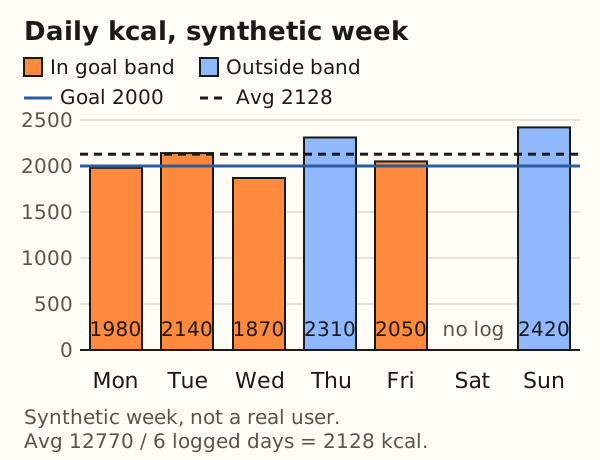
Worked example: the weekly question on Sunday.
- Sum of the six logged days:
1,980 + 2,140 + 1,870 + 2,310 + 2,050 + 2,420 = 12,770 kcal - Average per logged day:
12,770 / 6 = 2,128 kcal - Goal band, within 10 percent of 2,000:
2,000 x 0.9 = 1,800to2,000 x 1.1 = 2,200 kcal - Days in the band: Mon, Tue, Wed and Fri, so 4 of 6
Dividing by 7 would give 12,770 / 7 = 1,824 kcal, which treats the unlogged Saturday as a day of zero. The summary averages logged days only.
Three things in the week come from tools you never named. Tuesday and Wednesday use repeat_meal with a saved template, so a long breakfast becomes one phrase. Thursday shows the check. Sunday uses get_summary, which covers up to 92 days, while get_history lists days for up to 31. The same numbers appear as charts in the sample dashboard, which runs on sample data and needs no account.
Troubleshooting
Each row uses facts from the Remembite connect and support pages or from Claude's help, read on 2026-10-16. Claude's menus change, so use Claude's help for its screens.
| Symptom | Likely cause | What to try |
|---|---|---|
| Sign-in link says it is expired or used | The link works once and expires in 10 minutes | Request a new link and open it once |
| Nothing is saved after you press Decline | Without consent Remembite cannot store meals | Start the connection again and choose Agree and continue |
| You cannot add a second custom connector | Claude's help says Free users are limited to one | Remove the other connector or check your plan |
| No Add option on Team or Enterprise | An Owner (or a role with the right access) adds it first | Ask your organization Owner, then press Connect |
| Claude still reads after you disconnected | A disconnected app can keep access for up to 15 minutes | Wait 15 minutes and test again |
| A meal was not saved and Claude asks a question | A number looked far off, or macros added up to more than the calories | Answer the question: correct the numbers or confirm them |
| Claude asks permission before each tool call | Claude's tool approval requests | Read each request; choose "Allow always" only for tools you trust |
| Remembite tools seem missing in a chat | Tools can be turned off per conversation | Check Claude's "Search and tools" menu |
If a row does not fit, write to hello@remembite.com as listed on the support page.
Limits
- Numbers are estimates. Claude chooses the portion and the values. A plausible but wrong portion can pass every check.
- Photos are read by Claude. Remembite does not look at images. It only receives the items and numbers Claude sends.
- No import of earlier logs. Remembite does not offer importing a log from another app.
- ChatGPT is in beta. It works through developer mode, and Remembite is not in the ChatGPT apps directory yet.
- Connector rules belong to Claude. Plans, menu names and the one-connector limit on Free come from Claude and can change. Claude's pricing page, read on 2026-10-16, lists Connectors for the Free plan, and the help article gives the limit of one custom connector.
- No medical advice. Remembite is a tracking tool.
Remembite is not affiliated with Anthropic or OpenAI.
FAQ
Does Claude remember my meals without the connector?
Do not count on it. Claude's memory help describes saved topics that you can read, edit and delete in Settings > Memory. It does not describe a per-meal log with totals. For a record you can total and export, use a store such as Remembite.
Do I need to weigh my food?
No, but grams give Claude a firm number. If you describe "a bowl of rice", Claude has to guess the weight, and the portion is the biggest source of error.
Can I use Remembite with ChatGPT?
Yes, in beta. Turn on developer mode in ChatGPT and add Remembite as a custom MCP server. Steps.
Can I fix a meal I logged wrongly?
Yes. Ask Claude to change one item or delete the meal. A changed item goes through the same check as a new one. A deleted meal is permanent.
Who sees my meals?
Remembite stores them under your account, and it sends them to Claude when you ask Claude to show them. Claude's own terms then apply. You can export or delete your data on the Account page.
Try it
Create a free account and add Remembite to Claude, or open the sample dashboard first. Free to start. Any paid plan will be announced here before it begins.
Estimates, not medical advice. How the numbers work.
Start your own record
Create a free account with your email, then add Remembite to Claude. Want to look first? Watch Claude log a sample day, no account needed.