Saved foods and meal templates
Remembite can remember your own names for foods and whole meals you eat often. You create them by talking to Claude. You view and delete them in the app.
Save your own name for a food
Say what a phrase means: "Remember that my oats are 40 g of rolled oats."
Next time you say "my oats", Remembite uses that food and weight. The same phrase saved again replaces the earlier one.
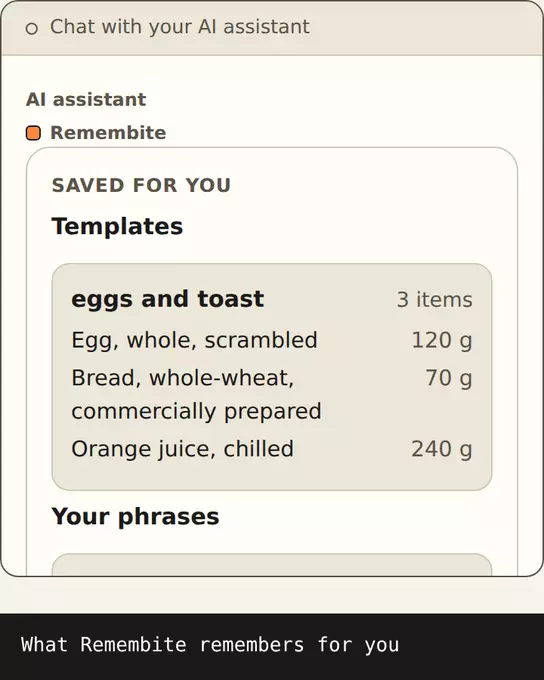
After you log a meal, Claude may offer to remember a food for you. Say yes to accept.
Save a meal as a template
Log the meal first, then say: "Save that as my usual breakfast."
The template keeps each item's name, weight and numbers, including foods outside the catalog. Saving the same name again, in any letter case, replaces the template.
Use it later: "Log my usual breakfast." See Repeat a meal.
See what is saved
- In the app, open My foods. It lists Your names for foods and Saved meals.
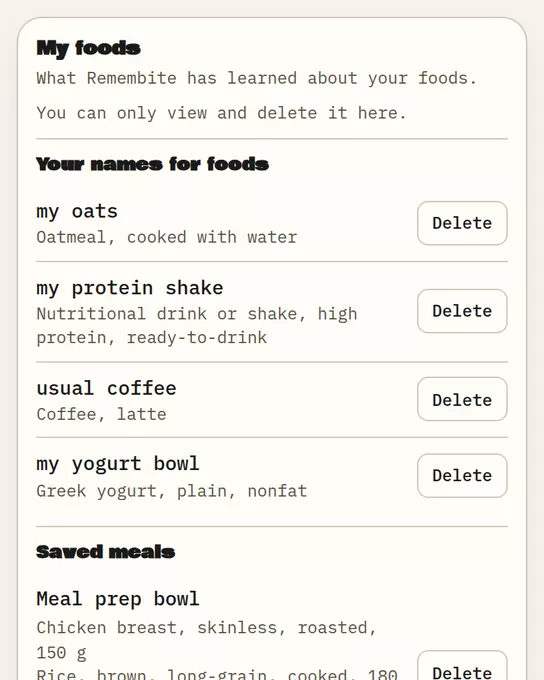
Sample data My foods: your names for foods and your saved meals. - Or ask Claude: "What have you saved for me?"
Delete a saved food or template
- In My foods, choose Delete, then Yes, delete.
- Or ask Claude: "Forget my oats" or "Delete my usual breakfast template."
Deleting a phrase or template does not change meals you already logged. The app only views and deletes. To create or change them, ask Claude.
Good to know
- Names you save are tied to foods in the Remembite catalog. A food outside the catalog still logs, but "my oats" works only for catalog foods.
Start your own record
Create a free account with your email, then add Remembite to Claude. Want to look first? Watch Claude log a sample day, no account needed.