MyFitnessPal Alternatives: Which Kind of Tracker Fits You
No single MyFitnessPal alternative suits everyone. The right one depends on whether you need daily barcode scanning, nutrient depth, targets that adjust, simple logging, or an AI chat with a saved record. This guide compares MyFitnessPal, Cronometer, MacroFactor, Lose It! and an AI-chat route using each vendor's own pages (opened on 2026-10-16, except three export help pages that blocked us; those rows carry their 2026-10-14 read date). Prices are US list prices as listed on the App Store and on Cronometer's site, checked October 2026. Remembite publishes this article and makes a product in this area, so we are not a neutral party.
Key takeaways
- Barcode scanning sits in a paid tier for MyFitnessPal and Lose It!, and inside the paid-only MacroFactor app. Cronometer's page lists it in the free Basic plan (as listed on cronometer.com, checked October 2026).
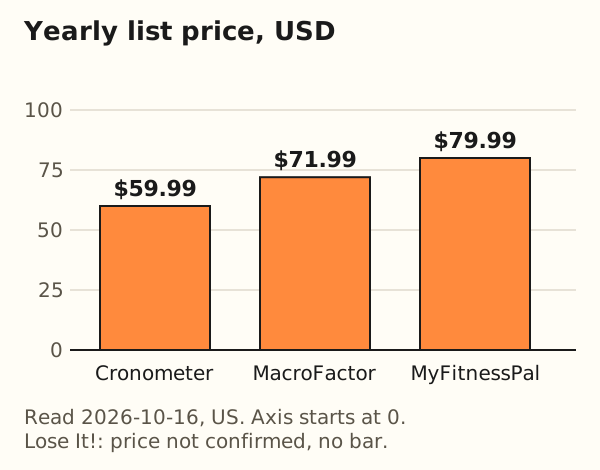
- Yearly list prices for the three apps with a confirmed price run from $59.99 (Cronometer Gold) to $79.99 (MyFitnessPal Premium), a $20.00 spread. Lose It! has no confirmed price here.
- Vendors describe their databases differently: lab-analyzed sources, reviewed user entries, or a very large food count. Two studies of MyFitnessPal report both strong and weak spots, so check the foods you eat most.
- Export your history before you cancel. MyFitnessPal lists Data Export for Premium subscribers.
- Remembite is an AI-chat route with a saved record. It has no barcode scanner, no meal photo recognition and no Apple Health or wearable sync.
Is there a single MyFitnessPal alternative for everyone?
No. We do not rank the options, because the facts that decide a choice are personal. Match your main need to a kind of tool:
- Daily barcode scanning of packaged food: an app with a scanner. All four apps below list one.
- Nutrient depth: a tracker that lists vitamins and minerals, such as Cronometer or Lose It! Premium.
- Targets that adjust: MacroFactor's listing describes a "dynamic algorithm" for calorie and macro targets.
- Simple logging: any of them in free or trial mode, or a plain spreadsheet.
- Talking to an AI and keeping a record: a chat plus a record layer, which is what Remembite offers.
Rules we followed. Competitor facts come from the vendor's own pages or from the papers cited, each with the date read. Where a page would not open or did not say, the table says "not confirmed". Single-product detail on MyFitnessPal Premium is in is MyFitnessPal Premium worth it, and the step-by-step export tour is in how to export your food log.
Why do people look for a MyFitnessPal alternative?
The documented reasons are reported ones, not universal ones. Three have a source we opened.
Logging is hard in general. Cordeiro and colleagues (CHI 2015) surveyed 141 food journalers (47 active, 94 lapsed) and read 5,526 posts in 627 threads from the MyFitnessPal, FatSecret and CalorieCount communities. Respondents described journaling as too much effort. Forgetting to log was the most common reason for missed entries, and missed entries made the day's totals unreliable. One forum user wrote: "Every time I start I forget one meal or another." That study asks why logging is difficult. It does not survey people who left MyFitnessPal.
A feature moved behind a paywall. On August 24, 2022, Droid Life reported a MyFitnessPal email saying: "Beginning October 1, Barcode Scan will be available only with a Premium subscription." Today's App Store listing for MyFitnessPal still names barcode scanning under Premium.
Doubts about crowd-sourced entries. The Cordeiro survey includes a respondent who noted that the food database is put together by users, so entries vary. Two later studies of MyFitnessPal measured that question directly. We cover them in the database section.
What this does not show: how many people switch for each reason, or whether any alternative fixes them. Some people leave over price, some over a feature, and many keep what they have.
How do the options compare at a glance?
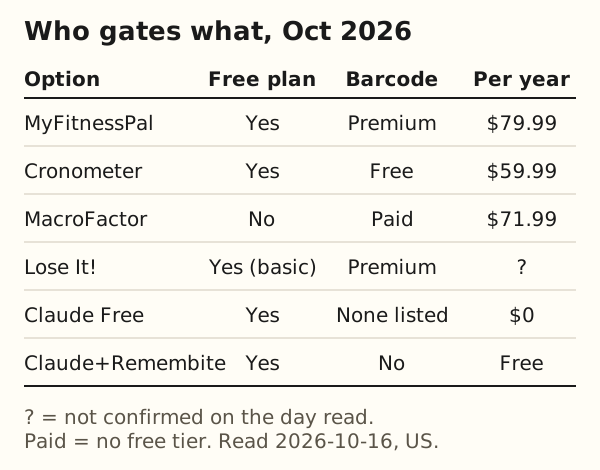
Table 1 lists what each vendor's page says about a free plan, barcode scanning and its database. We read these pages on 2026-10-16 (US).
| Option | Free plan | Barcode | Database wording | Source |
|---|---|---|---|---|
| MyFitnessPal | Free tier covers nutrition, weight and exercise tracking | Premium | "20.5M+ foods, including restaurant dishes" | App Store listing, Premium page |
| Cronometer | Basic ($0): logging, custom foods and targets, reports limited to a 7-day window | Free (Basic) | over 1M lab-analyzed or verified foods | Cronometer Gold page |
| MacroFactor | None; 7-day trial | Paid app | Verified food database(listing wording) | App Store listing |
| Lose It! | Free Basic features listed: calorie tracking, weight loss plan, community | Premium | "a global food database of 56+ million items and recipes" | App Store listing |
| Claude Free (chat alone) | $0 plan with memory across conversations | None listed | No food database listed | Claude pricing |
| Claude + Remembite | Free to start | No | "foods it can confidently match to a USDA-based reference" | Remembite features page |
Two readings follow from the table. Among the four trackers, Cronometer is the only one whose page puts barcode scanning in a free plan. And device sync is a separate axis: the MyFitnessPal listing says "Connect 40+ fitness trackers, smartwatches & health apps", and the Lose It! listing names "Healthkit" among its Premium syncs. Remembite has no Apple Health or wearable sync.
What do the paid plans cost side by side?
Table 2 lists the prices each page states. The yearly figure is the one used in the chart.
| App | Monthly | Yearly | Trial | Source |
|---|---|---|---|---|
| MyFitnessPal Premium | $19.99 | $79.99 | Not stated on the US listing | App Store listing |
| Cronometer Gold | $10.99 | $59.99 | Free Basic plan instead | Cronometer Gold page |
| MacroFactor | $11.99 | $71.99 | 7 days | App Store listing |
| Lose It! Premium | Not confirmed | Not confirmed | Not stated | App Store listing |
Notes on the table. MacroFactor also lists a $47.99 six-month plan, which is $8.00 a month (47.99 / 6 = 7.998). The Cronometer page shows the yearly plan as "$4.99 per month, billed annually at $59.99" and the monthly plan at $10.99; the yearly-to-monthly pairing is our reading of the page layout. The MyFitnessPal listing shows two price points under the same plan names, $19.99 and $9.99 monthly, $79.99 and $49.99 yearly. We show the higher pair, and the listing does not say which price applies to whom, so treat the MyFitnessPal figures as list prices that may differ for you. The Lose It! listing shows ten Premium purchase items between $9.99 and $79.99, plus two Lifetime items at $49.99 and $59.99, with no durations. We cannot tie any of them to a monthly or yearly plan, so we quote none.
Worked example: monthly versus yearly billing for one year.
- MyFitnessPal:
12 x $19.99 = $239.88monthly, against$79.99yearly, so yearly is79.99 / 239.88 = 33%of the monthly total. - Cronometer:
12 x $10.99 = $131.88, yearly59.99 / 131.88 = 45%. - MacroFactor:
12 x $11.99 = $143.88, yearly71.99 / 143.88 = 50%.
Paying monthly for a full year costs 3.0, 2.2 and 2.0 times the yearly price. The $20.00 gap between the lowest and highest yearly prices (79.99 - 59.99) is 20 / 12 = $1.67 a month.
Price is one input. A free plan that covers how you log can cost $0, and a paid plan you never open costs its full price. For the per-day value of one subscription, see the MyFitnessPal Premium breakdown.
Where do the food databases come from?
The wording below is each vendor's own, quoted with its source. We do not vouch for any database in our own voice. Vendor claims are claims.
MyFitnessPal
The App Store listing says: "Log meals effortlessly from 20.5M+ foods, including restaurant dishes." We found no MyFitnessPal help page we could open that describes how entries are reviewed, so we quote no vendor wording on that. The researchers behind the studies below describe it as user-based: "partially user-based and thus inherently prone to errors" (Evenepoel 2020), and built from user entries with no way to validate them (Banal 2024).
Cronometer
Cronometer's database page says it draws on "over 10 different trusted sources from around the globe", naming NCCDB, USDA SR28 and CNF 2015 among others, and describes its data as "sourced from lab-analyzed data, not crowd-sourced guesses". It also says each submitted item "undergoes a verification process". The Gold page lists a database of over 1M lab-analyzed or verified foods
. The pages we opened do not say how many foods in total, or who may submit one.
MacroFactor
MacroFactor's help center says its foods come from highly vetted research databases, and verified user-submitted entries
, and that submissions are "all checked for accuracy by other humans before the foods are added to the public database". A second help article gives counts: around 1,360,000 verified food items accessible via search
in the standard database, and around 26,500 micronutrient-complete common foods from research databases. It adds that common-food data comes largely from the NCC Food and Nutrient Database. Coverage notes are candid: "Coverage is not as strong for restaurant food items", and barcode coverage is "excellent in the United States, Canada, the UK, Australia, Ireland".
Lose It!
The listing says you can "scan food barcodes or search our database of items and recipes" and describes "a global food database of 56+ million items and recipes". The pages we opened do not say where those entries come from or who may submit one.
What two studies add
Both studies tested MyFitnessPal only. We opened no comparable validation for the other apps, and that is a gap in the evidence, not a result.
| Study | Sample | Reference | Energy | Other |
|---|---|---|---|---|
| Evenepoel et al., JMIR 2020 | 50 adults, two 4-day records | Belgian Nubel database | +1.3% vs reference; r = 0.96 (after extreme values were removed) | After the same cleaning step: protein -7.8%, carbs -6.4%, fat -1.7%; sodium under-reported by 1,345 mg/day |
| Banal et al., BMJ NPH 2024 | 37 adults with obesity, 5 days | Philippine food composition tables | 1,702 vs 1,848 kcal (-7.9%) | Protein 76.9 vs 61.5 g (+25%); fat 54.5 vs 72.5 g (-25%) |
Our arithmetic for Banal: (1,848 - 1,702) / 1,848 = 7.9%; (76.9 - 61.5) / 61.5 = 25.0%; (72.5 - 54.5) / 72.5 = 24.8%. The carbohydrate gap (215.6 vs 236.9 g) was not significant.
The two papers point in different directions. Evenepoel's authors judged the app suitable for total energy and macronutrients, with the exception of cholesterol and sodium. Banal's authors called validity poor in their sample. They also differ in the reference tables, the country, the people and the days logged. Their figures come after the authors removed extremely high, likely erroneous values with a cleaning algorithm. Evenepoel's participants received a manual on how to log, and the authors advise using one together with a data cleaning step. Banal's dietitians noted missing Filipino foods. Neither study tells you how a different app, or your own food list, would score.
A practical test beats a debate. Pick five foods you eat weekly, look up each in the app you are considering, and compare the calories and protein with the package label or with a weighed portion. Banal's authors note that a MyFitnessPal entry needs only a name and an energy value, so other nutrient fields may be missing or wrong. Check the fields you rely on, such as protein or sodium.
Can you take your data with you?
Export rules differ, and a change of plan can change them. Table 3 gives one line per vendor. The details and the file layouts are in our export guide.
| App | Export stance | Source |
|---|---|---|
| MyFitnessPal | CSV files in one zip, emailed. Data Export is listed for Premium and Premium+ (read 2026-10-14). | MyFitnessPal help |
| Cronometer | CSV export; the Basic plan lists "Ability to export ALL raw data" (read 2026-10-14). | Cronometer help |
| MacroFactor | More, then Data Management, then Data Export. Granular Export gives separate spreadsheets by data type; Quick Export gives a progress summary (read 2026-10-16). | MacroFactor help |
| Lose It! | Full account download from loseit.com; the help page says weight history alone cannot be downloaded (read 2026-10-14). | Lose It! help |
| Remembite | Any free account: JSON of everything stored, and a CSV with one row per food and 23 columns. | Export guide |
Whether another app can import your file is that app's rule. Remembite does not import CSV files from other apps, so a switch to Remembite starts a new record while your old history stays in your export file.
Which kind of tracker fits you?
Answer the five questions from the top and stop at the first yes that matters to you. These are types of tool, not rankings.
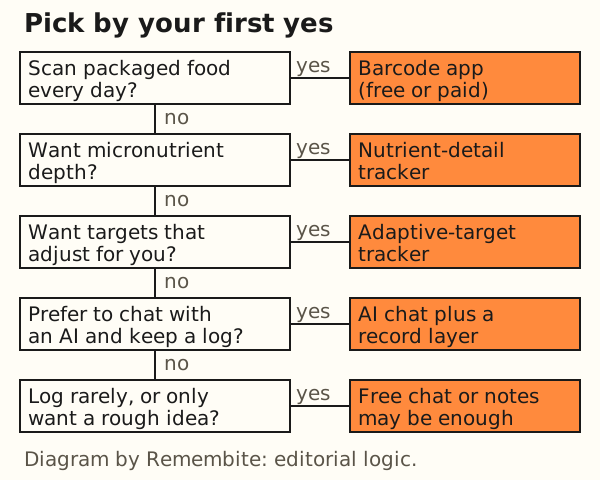
- Do you scan packaged food every day? Pick an app with a scanner. All four trackers list one. Cronometer is the only one whose page puts it in a free plan.
- Do you want micronutrient depth? Look at trackers that list vitamins and minerals. Cronometer's Gold page lists nutrient tracking "up to 95 nutrients" and gives 84 elsewhere on the same page, so confirm the current figure. The Lose It! listing names vitamins and minerals under Premium Advanced Tracking.
- Do you want targets that adjust? MacroFactor's listing says its "dynamic algorithm" adapts to changes in your metabolism and that "weekly check-ins keep you on track". The listing is a vendor description, not a test.
- Would you rather talk to an AI and keep a record? That is the chat-plus-record route, covered next.
- Do you log rarely? A free chat or a notes file may be enough. See the last section before the FAQ.
What about an AI chat plus a saved record?
Claude's Free plan costs $0 and lists memory across conversations (claude.com/pricing, read 2026-10-16). You can describe a meal and ask for an estimate. A chat alone gives you a number in a sentence, not a log with totals you can chart, and the estimate is only as good as the portion you state. How well a chat does is in can ChatGPT or Claude track calories.
Remembite adds the record. Your AI works out the calories and macros, and Remembite saves every meal, draws charts, and remembers foods you name. Before saving, it compares each food it can confidently match to a USDA-based reference and checks the protein, carbs and fat against the calories. If a number looks far off, it does not save it. It sends a question back to your AI, which asks you to confirm or fix it. The Claude connector works now, and ChatGPT works in beta (via developer mode); see how to connect. The sample dashboard runs on sample meals with no account. How the pieces fit together is in how Remembite works.
What it lacks, plainly: no barcode scanner, no meal photo recognition, and no Apple Health or wearable sync. A food it cannot match has no reference to compare against, so your AI's number is the one saved.
How should you switch without losing a week?
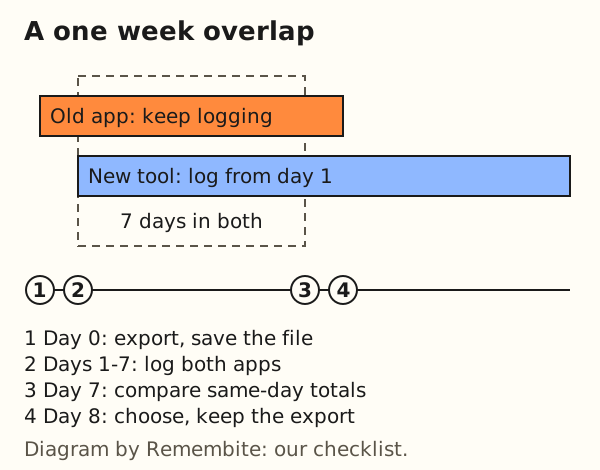
- Export from the old app first. If the export sits behind a paid tier, as MyFitnessPal's does, take it before you cancel.
- Save the file in two places and open it once to confirm it reads.
- Log the same meals in both apps for seven days. Same foods, same weights.
- Compare the same day's totals. Expect differences. The apps use different databases and different default portions.
- Judge by what you measured: minutes spent per day, entries you had to fix, features you missed.
- Cancel the old plan only after steps 1 to 5, and keep the export file.
Worked example: illustrative numbers, not a measurement.
- Day 3: old app
1,920 kcal, new app1,810 kcal. - Gap:
1,920 - 1,810 = 110 kcal, which is110 / 1,920 = 5.7%.
A gap of a few percent on one day says the databases differ. A gap that repeats in the same direction on all seven days tells you which app runs higher for your foods.
Do you need an alternative at all?
Not always. Four cases:
- You scan packaged food daily and like your plan. Keep it. Check what you use in the Premium breakdown before paying again.
- You cook and weigh food and live in an AI chat. A free chat may do.
- You log a few days a month. A free tier or a notes file is enough.
- You are not sure. Write down the three features you use every day, try a free option for a week, and note each time you hit a limit.
Doing nothing is also a valid result of this page.
Frequently asked questions
Is there a free MyFitnessPal alternative with a barcode scanner?
Cronometer's Gold page lists "Barcode Scanner" in the free Basic plan (as listed on cronometer.com, checked October 2026). Basic limits reports and charts to a 7-day window.
Can I keep my MyFitnessPal history when I switch?
You can export it. The MyFitnessPal help center lists Data Export for Premium and Premium+ subscribers, as CSV files in a zip. Whether a new app imports that file depends on the new app. Remembite does not import CSV files.
Do all these apps use the same food database?
No. Each vendor describes its own, as quoted above, so the same meal can total differently. Compare one day's totals in both apps before you decide.
Can ChatGPT or Claude replace a calorie app?
For occasional estimates, a chat can be enough. A chat alone does not give you a structured log with totals, and its estimates can be off, especially portions. The studies are in our chat guide.
Is Remembite a full MyFitnessPal replacement?
No. It has no barcode scanner, no meal photo recognition and no Apple Health or wearable sync. It suits people who already log by chatting with Claude and want the meals saved and charted.
Try it or keep comparing
To see what a saved record looks like, open the sample dashboard, which runs on sample meals. To keep your own record, create a free account. Remembite is free to start. Any paid plan will be announced here before it begins.
Remembite publishes this article and makes a product in this area, so we are not a neutral party. Remembite is not affiliated with MyFitnessPal, Cronometer, MacroFactor, Lose It!, Anthropic or OpenAI.
Estimates, not medical advice. How the numbers work.
Start your own record
Create a free account with your email, then add Remembite to Claude. Want to look first? Watch Claude log a sample day, no account needed.