AI Food Logging: What It Is and What It Misses
AI food logging means telling an assistant what you ate in plain words and getting the meal recorded with nutrition numbers. The assistant makes the estimate. What differs between tools is what happens to that estimate afterward, and that is the part worth checking.
What is AI food logging?
It is four steps: describe, estimate, check, keep. You describe the meal. The assistant turns the sentence into foods and amounts and estimates the calories and macros. A check can compare those numbers with a reference. Then the meal is kept so you can see the day later. Tools differ in who does steps 2 to 4, and some skip steps 3 and 4. For a meal with several foods, see how to calculate calories in a mixed meal.
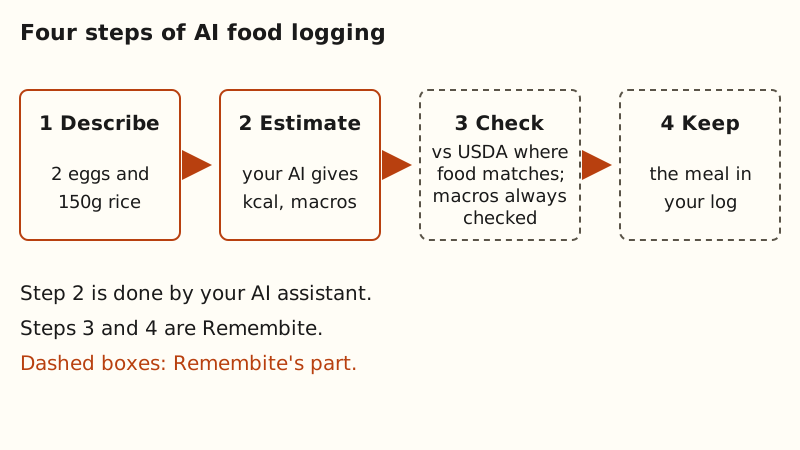
Take the sentence "2 eggs and 150g rice". The weak spot is the rice. USDA FoodData Central lists white rice at 130 kcal per 100 g cooked and 365 kcal per 100 g raw (white rice page). So 150 g is 195 kcal cooked or about 548 kcal raw (our arithmetic: 1.5 times each figure). An assistant that guesses the wrong state is off by more than 350 kcal on that one food. A good tool states which state it assumed, so you can correct it.
What are the three designs, and what is each good at?
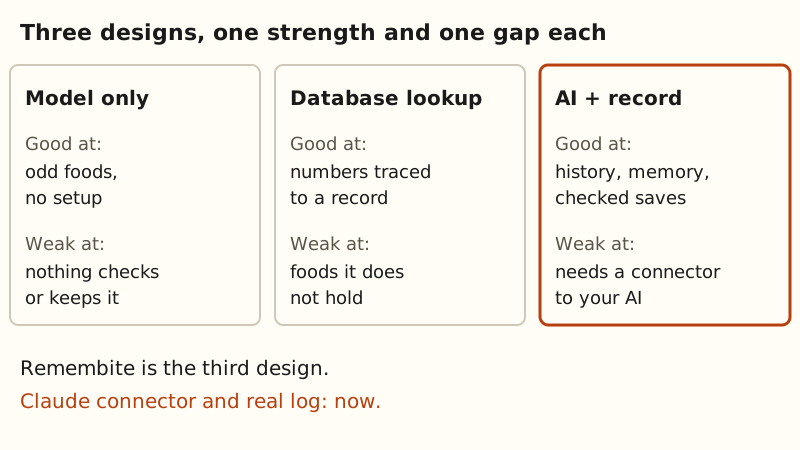
Most tools fall into one of three designs.
- The model estimates, nothing more. You describe the meal and the model writes back numbers. It is fast, needs no setup and copes with any food you can describe. The number is the model's own estimate. Nothing checks it and nothing keeps it.
- A database does the lookup. The tool matches each food to a record in a nutrition database and adds up the numbers. Each number traces to a record. It only knows the foods the database holds.
- The assistant estimates and a record layer keeps the meals. Your assistant estimates the calories and macros. A separate tool stores each meal, shows the day and the history, remembers what "my oats" means, and compares the numbers with a reference before saving. It needs a connection between the assistant and the tool.
For a side-by-side of the first and third designs, read Ask AI for Calories, Look Them Up, or Keep a Record?. For what a chat assistant does on its own, see how to count calories with ChatGPT and can ChatGPT or Claude track calories. To see how a connected log works in Claude, read how to log meals with Claude.
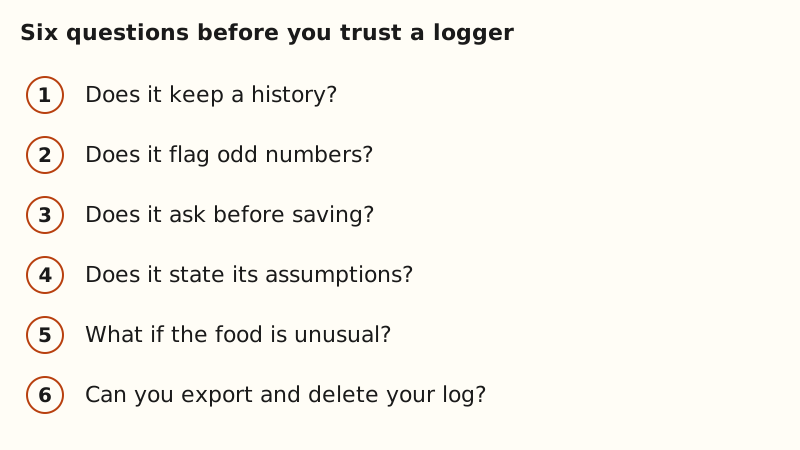
What should you check before trusting a food logger?
These are questions for you to answer, not a score for any product. Try them with a meal you know well.
- Does it keep a history? A chat forgets, and totals do not carry over. A log lets you open last Tuesday.
- Does it flag numbers that look off? A single estimate can be far from the reference for that food, or its protein, carbs and fat may not add up to its calories. A tool that checks can catch these before they enter your log. You can run the same checks by hand: see how to check an AI calorie estimate in 3 steps.
- Does it ask before saving, or save silently? Asking costs you a few seconds. A silent save leaves a wrong number in your totals.
- Does it state its assumptions? Raw or cooked, boiled or fried, a small or large egg: each moves the total. The raw vs cooked guide shows how much.
- What happens with an unusual food? Look for a tool that says when it has no reference rather than hiding it.
- Can you export and delete your log? A food log records what you ate. You should be able to take it out or remove it.
One more check applies to tools that connect to an assistant: your plan. Claude's support page says custom connectors using remote MCP are available on its Free, Pro, Max, Team and Enterprise plans, and that Free users are limited to one custom connector (Claude Help Center, as of 2026-10-09). Before you rely on a connector, check how many your plan holds.
Where does AI food logging fall short?
Foods with no reference. A reference database knows only the foods in it. For a homemade smoothie bowl or a regional dish, a tool has nothing to compare the estimate with. It can still check that the protein, carbs and fat fit the calories, but the calories themselves rest on the assistant's guess.
Restaurant dishes. A restaurant plate has no standard recipe, so any tool is guessing at the oil, the portion and the sauce. Treat the result as rough. The eating out use case covers this.
Photos. One peer-reviewed study gave ChatGPT-4 114 photographs of Irish meals (O'Hara et al., Nutrients, 2025; full text read via Europe PMC on 2026-10-09). The model named the foods well, with precision of 93.0%. Portion size was the weak point: it underestimated the weight in 87 of the 114 photographs, and for large meals the real mean weight was 798.1 g against an estimated 529.5 g. Agreement was poor for 10 of the 16 nutrients. The median energy estimate was close to the median real value (525 against 524.5 kcal). The authors note that they did not test reproducibility, and that performance may change as models are updated. The study used photographs, not typed sentences, and one model at one point in time.
Remembite's own limits. Remembite has no photo recognition, no barcode scanning and no device sync. You describe the meal in words to your assistant.
Where does Remembite fit?
Remembite is the record layer in the third design. Your assistant estimates the meal and sends the foods, amounts and numbers. Before it saves a meal, Remembite compares each food it can confidently match to a USDA-based reference, and checks the protein, carbs and fat against the calories. If a number looks far off, Remembite does not save it. It sends a question back to your AI, which asks you to confirm or fix it (how it works). Then it keeps the meal: a day view, history and trends, and the foods and meals you name. The history charts your calories and macros over 7, 30 and 90 days, with the average for each range (how to read a weekly calorie average), and your account can export your log as JSON or CSV (export your food log).
The Claude connector, a real log, memory and history for your own meals are available with a free account. ChatGPT works in beta, via developer mode. The demo dashboard shows the layout on sample data. The features page has the status of each part, and the methodology page explains the reference values.
Remembite is not affiliated with Anthropic or OpenAI.
To see what a kept log looks like, open the sample dashboard. To keep your own record, create a free account.
Estimates, not medical advice. How the numbers work.
Start your own record
Create a free account with your email, then add Remembite to Claude. Want to look first? Watch Claude log a sample day, no account needed.