Create your Remembite account
You create your account with your email address. Remembite sends a one-time link, and there is no password.
Steps
- Open remembite.com/login.
- Type your email and choose Send sign-in link.
- Open the email from Remembite and choose the link. The link works once and expires in 10 minutes.
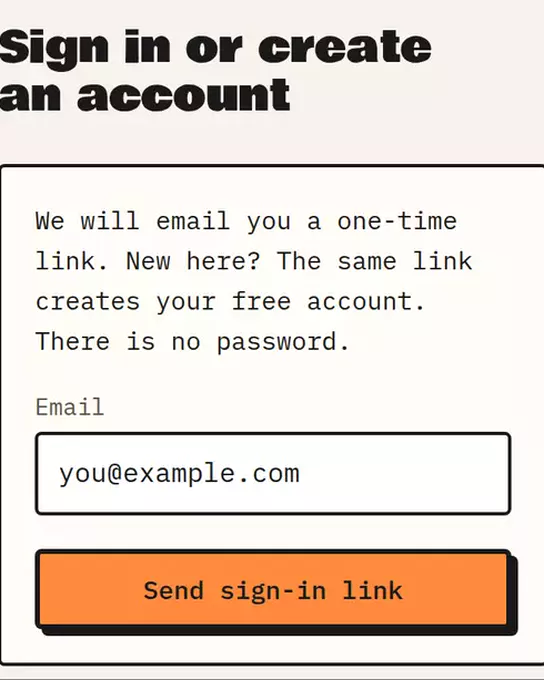
Sample data The Remembite sign-in page: type your email, then choose Send sign-in link. - You land in the Remembite app on a Get started screen. It shows three steps: create your account, add Remembite to Claude, log your first meal.
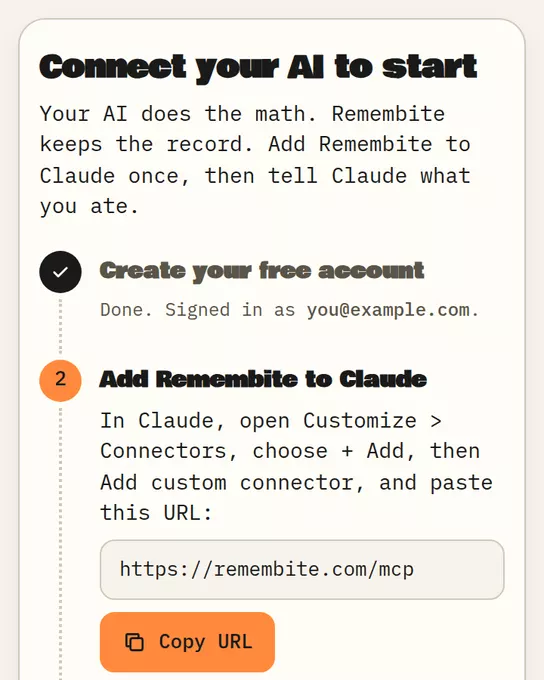
Sample data Get started: step 1 is done, step 2 shows the connector URL.
The same link signs you in later. New and returning users use the same form.
If the email does not arrive
It can take a minute. Check your spam folder. If it still does not come, see Sign-in email problems.
If sign-ups are paused
When Remembite pauses new accounts, the sign-in page says "New sign-ups are paused. Existing accounts can sign in." Existing accounts keep working.
Next step
Connect your AI app so it can save meals to your record.
Want to look around first? The sample dashboard uses sample data and needs no account.
Start your own record
Create a free account with your email, then add Remembite to Claude. Want to look first? Watch Claude log a sample day, no account needed.