How to Cancel MyFitnessPal Premium on iPhone, Android and the Web
You cancel MyFitnessPal Premium in the place where you paid for it: the MyFitnessPal website, the Apple App Store or Google Play. Deleting the app does not end billing on Google Play (Google Play Help says so), and MyFitnessPal's terms say deleting your account may not cancel a subscription either. Once you cancel, the terms say the change takes effect at the end of your billing period, so Premium stays on until then.
Key takeaways
- Cancel where you subscribed. A website sign-up, an Apple purchase and a Google Play purchase are three separate routes.
- On Google Play, uninstalling the app does not cancel the subscription. Cancel on the subscriptions page.
- MyFitnessPal's terms say a cancellation takes effect at the end of your billing period. The Premium page says features stay available until the paid period ends.
- Free trials turn into paid plans unless you cancel before they end. Apple's page says to cancel at least 24 hours before the trial ends.
- Refund rules differ by route. The MyFitnessPal terms call purchases final and non-refundable "except at our sole discretion".
- MyFitnessPal's help center says cancelling turns off auto-renewal, and that cancelling less than 24 hours before renewal may not stop it (help article updated 2026-10-05, checked October 2026).
Where did you subscribe to MyFitnessPal Premium?
The route depends on how the first payment was made. MyFitnessPal's Premium page says: "You may cancel in the Settings menu, in the App Store or in Google Play, depending on where you signed up" (as listed on myfitnesspal.com/premium, checked October 2026). If you cannot remember, Apple's page suggests searching your email for a "receipt from Apple" or "invoice from Apple" and checking which Apple Account it names.
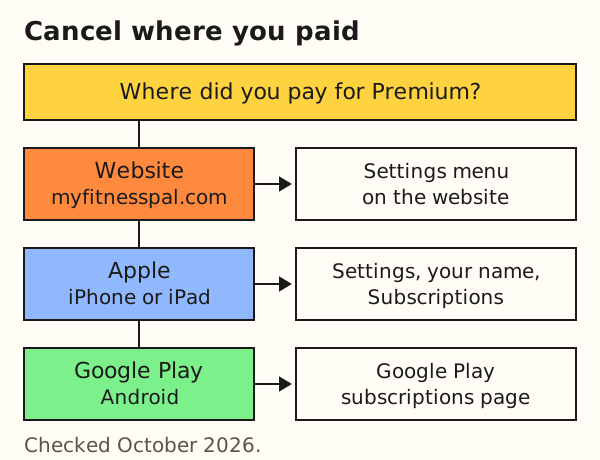
| Route | Where to cancel | Source |
|---|---|---|
| Signed up on myfitnesspal.com | The Settings menu on the website | MyFitnessPal Terms of Service, checked October 2026 |
| Bought in the App Store (iPhone, iPad) | Settings, your name, Subscriptions | Apple Support, cancel a subscription, checked October 2026 |
| Bought in Google Play (Android) | The subscriptions page in Google Play | Google Play Help, cancel a subscription, checked October 2026 |
How do you cancel on the MyFitnessPal website?
Use this route only if you signed up on myfitnesspal.com. The terms say: "If you signed up at www.MyFitnessPal.com, you may cancel your subscription to Premium Services in the 'Settings' menu" (MyFitnessPal Terms of Service, effective March 18, 2025, checked October 2026).
- Log in at myfitnesspal.com with the same email and password as the app.
- Click Settings, then click Subscription Settings.
- Set the Auto-Renewal toggle at the bottom from On to Off.
Source: MyFitnessPal help, "How to cancel your Premium subscription renewal" (updated 2026-10-05, help article), checked October 2026. The article says you must cancel on the same platform where you originally paid. Menu names on your screen are the final word.
How do you cancel on iPhone or iPad?
Apple's page lists these steps (Apple Support, "Cancel a subscription", checked October 2026):
- Open Settings and tap your name at the top.
- Tap Subscriptions.
- Tap MyFitnessPal.
- Tap Cancel Subscription. You may need to scroll down.
Apple adds that if there is no Cancel button, or you see an expiration message in red text, the subscription is already canceled. The same page lists a Mac route (App Store, your name, Subscriptions) and a web route at account.apple.com. Family members must cancel their own subscriptions, because you cannot cancel theirs.
How do you cancel on Android?
Google Play Help lists these steps (checked October 2026):
- On your Android device, open your subscriptions page in Google Play.
- Select the MyFitnessPal subscription.
- Tap Cancel subscription.
- Complete the prompts that appear.
MyFitnessPal's own article gives the same path with its labels: Play Store, profile icon, Payments and subscriptions, Subscriptions, your MyFitnessPal subscription, Cancel Subscription. Google's page does not list separate web steps and points to a self-help flow instead. It also says: "When you uninstall the app, your subscription won't cancel."
What happens after you cancel?
You keep Premium until the paid period ends. MyFitnessPal's terms say: "The cancellation or downgrade of a subscription will go into effect at the end of your billing period." The Premium page says the same in other words. Google Play Help gives an example: a yearly plan bought January 1 and canceled July 1 stays active until December 31 and does not renew the next January 1.
Apple's cancel page does not say whether access continues after you cancel. For a subscription bought through Apple, rely on the MyFitnessPal statement above and confirm the end date in your Apple subscription screen.
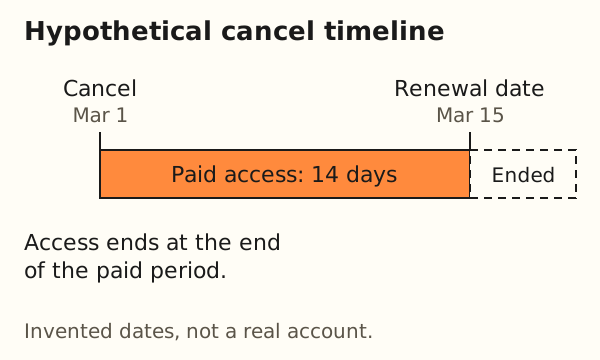
Worked example: a hypothetical yearly plan renews on March 15, 2027. You cancel on March 1, 2027. (Dates are invented.)
- Days of paid access left:
15 - 1 = 14 days - Renewal charge: none, if the cancellation registered more than 24 hours before the renewal
MyFitnessPal's help says that if you cancel less than 24 hours before renewal, the subscription may still renew. Cancel days before the renewal date.
The next table sets the official statements side by side. A blank answer means the page does not say.
| Topic | MyFitnessPal | Apple | Google Play |
|---|---|---|---|
| Access after cancelling | Premium features stay until the end of the paid period | Page does not say | You can use what you already paid for |
| Deleting the app or account | Deleting your account may not cancel the subscription | Page does not say | Uninstalling the app does not cancel |
| Free trial | Access continues automatically unless you cancel before the trial ends | Cancel at least 24 hours before it ends | Page does not mention trials |
| Refund | Final and non-refundable except at its discretion | Request via Report a Problem; eligibility varies by region | Past subscriptions can't be refunded, with exceptions |
Sources: MyFitnessPal Terms of Service and Premium page, Apple Support on canceling and on refunds, Google Play Help on canceling, all checked October 2026.
How does a free trial end?
The MyFitnessPal terms say: "Unless you cancel before the end of the Free Trial period, your access to the Premium Service will automatically continue." The Premium page lists a 7-day free trial for people who never upgraded or started a Premium trial before (checked October 2026; the offer can differ by country). Cancel the trial through the same route you used to start it.
Can you get a refund?
Not by default. The terms say: "All purchases of Premium Services are final and non-refundable, except at our sole discretion." They add that people outside the US may be entitled to a full refund within 14 days of signing up. Apple's refund page says some purchases "might be eligible" and that eligibility varies by country or region; it asks you to sign in at reportaproblem.apple.com. Google's page says past subscriptions can't be refunded, with exceptions in its refund policies. This guide does not promise a refund. Ask the store or MyFitnessPal support.
How do you confirm the cancellation worked?
Look at the subscription screen of the route you used. On iPhone and iPad, Apple says that if there is no Cancel button, or you see an expiration message in red text, the subscription is already canceled. On Google Play, the subscriptions page is the place to check, since the cancel steps start there. On the website route, open Settings, then Subscription Settings, and check that Auto-Renewal shows Off.
Keep the confirmation email or a screenshot with the date. If a charge still appears after your renewal date, contact the party that billed you: Apple, Google or MyFitnessPal support. Apple's pages add that family members must cancel their own subscriptions, and that with several Apple Accounts you should check each one for the charge.
What should you do before you cancel?
Take your data first. When our export guide read MyFitnessPal's export page on 2026-10-14, it listed Data Export for Premium and Premium+ subscribers. The page, updated 2026-08-27, still says "Data Export is available to Premium and Premium+ subscribers" (checked October 2026). The safe order is to export while your paid period is active, then let the subscription lapse.
The guide export your food log covers the file types and what each app says. Do not restate its details from memory, as app help pages change.
Is cancelling the same as deleting your account?
No. They are two actions. Cancelling stops the next charge. Deleting removes the account. The terms say: "You can delete your account at any time. If you delete your account, it usually cannot be recovered." They also say deleting your account may not result in a cancellation of your subscription.
So the order matters. Cancel through your billing route, confirm the end date, export what you want to keep, and only then decide on deletion. MyFitnessPal's help says account deletion is permanent and cannot be undone ("How to delete your MyFitnessPal account", updated 2026-09-30, checked October 2026). The app route is More, Help, Delete Account. The website route is Settings, Delete Account.
What can you use after Premium?
For what Premium adds and what it costs, see is MyFitnessPal Premium worth it. For other apps see MyFitnessPal alternatives.
Remembite is a different kind of tool. You log meals by chatting with Claude, and Remembite saves each meal and charts it. Setup is in log meals with Claude and on the connect page. A way to track without any app is in macro tracking without an app. Sign-up is open. Free to start. Any paid plan will be announced here before it begins. Remembite does not import MyFitnessPal files, and it has no mobile app or barcode scanning. We make a product in this area, so we are not a neutral party, and Remembite is not affiliated with MyFitnessPal, Apple or Google.
What can this page not tell you?
- Menus change. Apple, Google and MyFitnessPal rename screens. This page was checked in October 2026.
- Region and device. Prices, trials and refund rights differ by country and by device. The Premium page we opened showed prices in Vietnamese dong, so we quote none.
- Silent pages. The pages we opened do not say what happens to your food diary after Premium ends. Ask MyFitnessPal support.
- No legal advice. Your contract is with MyFitnessPal, Apple or Google.
Frequently asked questions
How do I cancel MyFitnessPal Premium?
Cancel where you paid: the Settings menu on myfitnesspal.com, Apple's Subscriptions screen, or the Google Play subscriptions page. Steps are above.
How do I cancel the free trial?
Use the same route you used to start it. The terms say access continues automatically unless you cancel before the trial ends. Apple's page says to cancel at least 24 hours before it ends.
Can I get a refund after cancelling?
The terms call purchases final and non-refundable except at MyFitnessPal's sole discretion, with a 14-day window for some people outside the US. Apple and Google run their own refund requests.
How do I cancel MyFitnessPal on iPhone?
Open Settings, tap your name, tap Subscriptions, tap MyFitnessPal, then tap Cancel Subscription.
Will I lose my food diary if I cancel?
The pages we opened do not say. They say Premium features stay until the paid period ends. Ask MyFitnessPal support, and export first if you can.
Estimates, not medical advice. How the numbers work.
Start your own record
Create a free account with your email, then add Remembite to Claude. Want to look first? Watch Claude log a sample day, no account needed.