Track Macros Without an App: 3 Methods Compared
You can track macros without installing a tracking app. The three options below differ in effort per meal and in what happens to the numbers afterward, so the right one depends on how much typing and checking you will tolerate.
Why do people want to skip the app?
One reason to skip the app is effort per meal: searching a list, choosing between near-identical entries, adjusting a serving. The aim is simple: a protein, carbohydrate and fat figure for each meal, with as little friction as you can sustain.
Method 1: a spreadsheet and USDA lookups
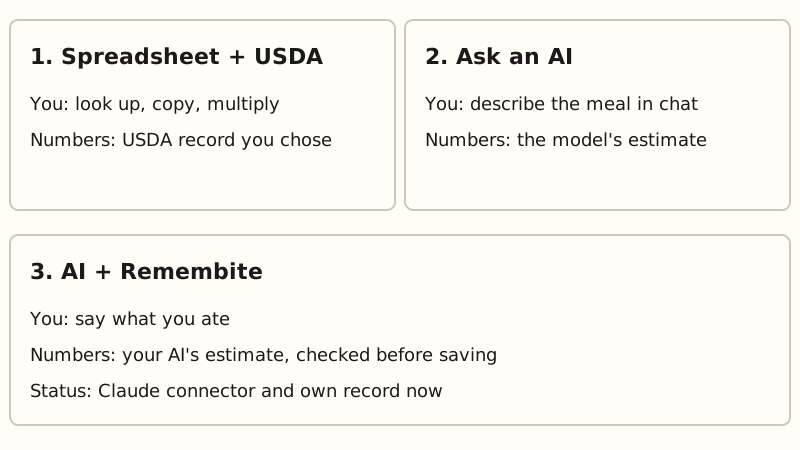
Look up each food in USDA FoodData Central, copy the per 100 g values into a sheet, and multiply by the weight you ate. The data is in the public domain (CC0) and the site has a search for foods. Each record has an ID, so you can always go back to the source.
It is the most transparent option and the most manual. Every new food is a new lookup, and you do the unit conversions yourself.
Method 2: ask an AI assistant
This is the fastest to start: describe the meal in a chat and read the reply. When an assistant answers from its own knowledge, the number comes from the model and there is no lookup to inspect. In the one peer-reviewed study we read, ChatGPT-4 given meal photographs underestimated weight in 76.3% of photographs, and the authors called for further research to link such models with nutrition databases (O'Hara et al., 2025). That study used photos, not text, so treat it as a caution, not a verdict. Our walkthrough is in how to count calories with ChatGPT, and the wider question is in can ChatGPT or Claude track calories.
The trade-off is that a chat is not a log. It forgets, daily totals do not carry over, and there is no history or chart.
Method 3: an AI assistant plus a record
Here the assistant still does the math. A separate record keeps what it estimated. Remembite is built this way: you chat with your AI, and Remembite stores each meal, charts your trends, remembers foods you name and flags numbers that look off. Before it saves a meal, it compares each food it can confidently match to a USDA-based reference, and checks the protein, carbs and fat against the calories. If a number looks far off, Remembite does not save it. It sends a question back to your AI, which asks you to confirm or fix it.
The Claude connector, saved meals and day totals are available with a free account. Remembite also works in ChatGPT (beta, via developer mode). The demo dashboard shows the layout on sample meals. Remembite is not affiliated with Anthropic or OpenAI. See the features and their status.
How do the three methods compare?
| Method | What you do at each meal | Where the numbers come from | What tends to break |
|---|---|---|---|
| 1. Spreadsheet + USDA | Look up, copy, multiply | USDA record you chose | Time per new food; wrong raw or cooked record |
| 2. Ask an AI | Describe the meal in chat | The model's estimate | Nothing to audit unless the assistant shows its source; no history; numbers can vary |
| 3. AI + Remembite | Say what you ate | Your AI's estimate, checked against a USDA-based reference before saving | The estimate is still an estimate, and portions are the usual source of error |
Pick one and stay consistent
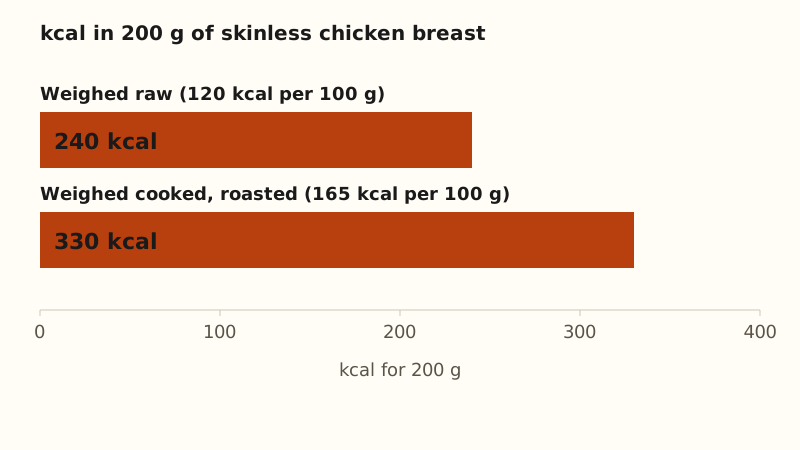
Any method works better if you use it the same way every time. A common repeatable slip is mixing raw and cooked weights. Raw and cooked foods are separate USDA records: skinless chicken breast is 120 kcal per 100 g raw and 165 kcal per 100 g roasted. "200 g of chicken breast" is 330 kcal if it was weighed cooked and 240 kcal if raw. Pick one state, usually the one you weigh on the plate, and keep to it. The full rule is in raw vs cooked calories, and the quantified self page covers keeping a consistent log over time.
If you are still choosing, open the sample dashboard to see what a saved record looks like. If you are deciding whether a paid app is worth it, read is a paid tracking app worth it and the alternatives guide. If you lift, macro tracking for lifters shows the same idea in your AI chat. For your own record, create a free account.
Estimates, not medical advice. How the numbers work.
Start your own record
Create a free account with your email, then add Remembite to Claude. Want to look first? Watch Claude log a sample day, no account needed.