Claude asks to connect Remembite again
If Claude asks you to connect or authorize Remembite again, choose Allow and carry on. Most often it happens once, at your first meal.
Why it happens
| Cause | What to do |
|---|---|
| Your first meal after connecting. Remembite connections used to ask for read access first and ask again when Claude first saved a meal. Since 2026-10-16 new connections ask for both at once. | Choose Allow once. |
| You disconnected Remembite on the Account page. Access can last up to 15 minutes after that. | Connect again. |
| You withdrew health data consent. | See Withdraw consent, "Give consent again". |
| Your sign-in to the connector expired. | Reconnect in Claude. |
Steps to reconnect
- In Claude, open Customize > Connectors.
- Find Remembite and connect it again. If it is not listed, choose + Add, then Add custom connector, and enter
https://remembite.com/mcp.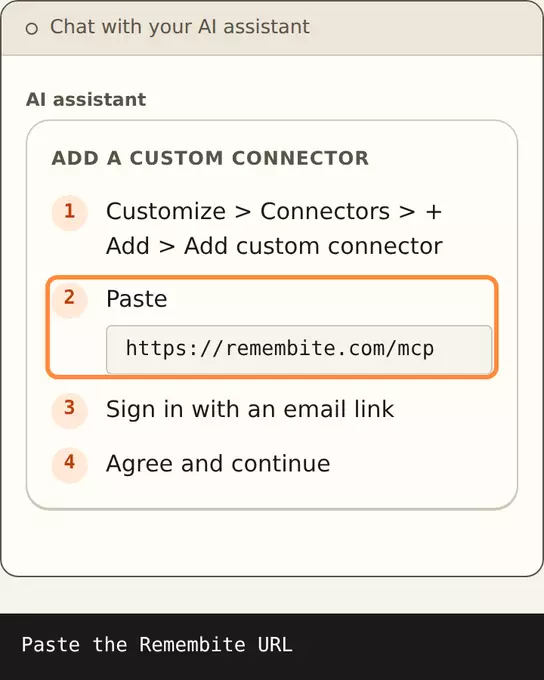
Illustration, sample data Steps 1 and 2: open Connectors, add a custom connector and paste https://remembite.com/mcp. - Sign in with the same email.
- Choose Allow (or Agree and continue if it asks for consent).
- Ask Claude to log your meal again.
You do not lose saved meals when you reconnect. They belong to your account.
Still stuck
- Open the app. If Get started says Claude is not connected, repeat the steps above.
- See Connector shows no tools.
- Write to hello@remembite.com.
Start your own record
Create a free account with your email, then add Remembite to Claude. Want to look first? Watch Claude log a sample day, no account needed.