What Is a Nutrition MCP Server? 6 Questions to Ask First
A nutrition MCP server is a program that gives an AI app such as Claude tools to log meals and read them back. MCP (Model Context Protocol) is the open standard the AI app uses to reach it. The server keeps the record, so a meal you describe in chat is written to a database and still there tomorrow.
Remembite publishes this page and runs one of the servers compared below. Every fact about the others comes from their own pages, opened on 2026-10-18. We did not install or test them.
Key takeaways
- MCP is "an open-source standard for connecting AI applications to external systems". A server offers tools, and the nutrition servers here document their features as tools.
- Claude's custom connectors reach remote MCP servers. Remote servers use Streamable HTTP, and a local server runs on your own machine over stdio.
- Six questions separate one server from another: where the data lives, which food database, who works out the numbers, what happens to a wrong number, which AI apps, and what it costs.
- Tool counts differ. Nutrition MCP lists 48 tools and Remembite 23. The Foodnoms and Ziva pages we read give no count.
- Anthropic's advice: connect Claude only to servers "built and hosted by organizations and applications you trust", and review the permissions requested.
What is MCP, in the protocol's own words?
The MCP introduction defines it in one sentence: "MCP (Model Context Protocol) is an open-source standard for connecting AI applications to external systems." It adds that AI applications like Claude or ChatGPT can connect to data sources, tools and workflows, and offers an analogy: "Think of MCP like a USB-C port for AI applications."
The architecture overview names three parts. The MCP host is "the AI application that coordinates and manages one or multiple MCP clients". The MCP client "maintains a connection to an MCP server". The MCP server is "a program that provides context to MCP clients". A server can expose three kinds of building block, called primitives: tools ("executable functions that AI applications can invoke to perform actions"), resources and prompts. A nutrition server is mostly a set of tools.
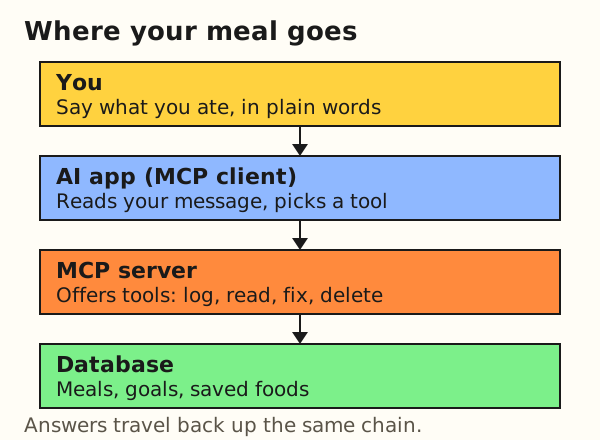
The protocol does not decide what a server stores or how it checks numbers. It only defines how the AI app finds the tools and calls them. Everything that matters to you as a user, from where the log lives to what happens to a wrong number, is a choice the server's maker made.
What does a nutrition MCP server do?
The products we read describe the same core in different words: log a meal, look up a food, read a day back, and set goals. Beyond that they diverge.
- Nutrition MCP lists 48 tools in seven groups: Logging (12), Reviewing (6), Water (4), Body (13), Goals (4), Insights (2) and Settings (7). Its tools page describes
log_mealas logging a meal "with calories and macros" andlookup_barcodeas fetching a packaged product's label data from Open Food Facts. - Foodnoms MCP describes abilities rather than tool names: read the food log, totals, goal progress, saved foods, recipes and body stats; search foods; add, edit, copy and delete entries. The page says it cannot change goals or the Body Profile.
- Ziva says the AI can use "the USDA food database, your meal log, saved recipes, and daily progress" once connected.
- Remembite has 23 tools: log, repeat, update and delete meals; log and delete plain water; log, read, update and delete body weight; read a day, a range or a summary; search reference foods; look up a packaged product by barcode in Open Food Facts; set and read goals; save and list your own foods and templates.
Here is what happens behind one chat message. The example is hypothetical and shows no real server output. The USDA values are from FoodData Central, SR Legacy, opened 2026-10-18.
Worked example: you type "I had 150 g of cooked rice and two boiled eggs." Reference values per 100 g: cooked white rice 130 kcal (FDC 168878), boiled egg 155 kcal (FDC 173424). FDC lists one large egg at 50 g.
- The AI app reads the message and splits it into two items: rice at 150 g and eggs at 2 x 50 g = 100 g.
- The AI works out the rice:
150 x 130 / 100 = 195 kcal - The AI works out the eggs:
100 x 155 / 100 = 155 kcal - The AI calls the server's log tool once, with both items and their numbers:
195 + 155 = 350 kcalin total. - The server saves the meal, or answers with a question if a number looks off. The AI tells you which happened.
You typed one sentence. The AI made one tool call, and the day's record changed.
Step 4 is where servers differ. Some save whatever arrives. Others check it first. Question 4 below covers that.
Six questions to ask before you connect one
Connecting a server gives it a place in a conversation that holds your meals, and meals can reveal health information. These six questions each have an answer on the product's own pages. If a page does not answer one, that is information too.
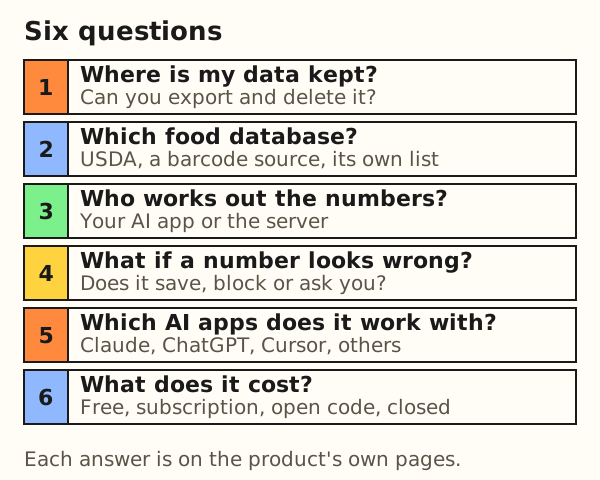
| Question | Why it matters | Where to look |
|---|---|---|
| 1. Where is my data kept? | A log you cannot export or delete is a log you cannot leave. | Privacy page, account or settings page |
| 2. Which food database? | The database sets which foods can be matched and how fresh the values are. | Home page, tools page, docs |
| 3. Who works out the numbers? | The party that computes a number is the one whose errors you inherit. | Tool descriptions, "how it works" page |
| 4. What happens when a number looks wrong? | A wrong number saved silently stays in your totals. | Tool descriptions, help page |
| 5. Which AI apps does it work with? | The connector must exist where you chat, on your plan. | Setup page, your AI app's connector help |
| 6. What does it cost, and is the code open? | A free listing can change, and open code lets others inspect it. | Pricing page, repository link |
1. Where is my data kept, and can I leave with it?
The pages we read answer this unevenly. Nutrition MCP says "Your logs are stored in the EU" and that you can export everything it stores about you as a ZIP of CSV files and delete your account and data whenever you want. Foodnoms says its MCP reads the log from Foodnoms Cloud; if you sync only through iCloud, the AI "will see an empty food log". It also notes that there is no built-in page yet to revoke an approved connection, so you email support. The Ziva pages we opened do not describe storage or export. Its privacy page was not part of what we read.
Remembite stores meals, goals and saved foods in its own database. The Account page can disconnect an AI app, download your data as JSON or CSV, withdraw your consent and delete your account. After you disconnect an app, it can keep access for up to 15 minutes. See export your food log for the file formats.
2. Which food database does it use?
USDA FoodData Central (FDC) appears on three of the four pages. The FDC about page describes it as "USDA's comprehensive source of food composition data with multiple distinct data types", five in all: Foundation Foods, SR Legacy, FNDDS, Experimental Foods and Branded Foods. SR Legacy was last released in 2018 and is no longer updated. Branded Foods is updated monthly. So "uses USDA data" covers values of very different ages.
Nutrition MCP says generic foods use FDC values and barcodes go to Open Food Facts. Ziva says "Every item matched to USDA FoodData Central". The Foodnoms MCP page does not name a food database. Remembite compares foods it can confidently match to a USDA-based reference. Foods it cannot match are saved as the AI sent them.
3. Who works out the numbers, the AI or the server?
This decides whose error you inherit. The Nutrition MCP tool description for log_meal says you log "what you ate with calories and macros", which reads as the numbers arriving with the call. The other pages we read do not say. Ask the question of any server before you trust its totals.
In Remembite the AI app works out grams, calories, protein, carbs and fat. The server saves the values it receives. The AI does the math, and Remembite keeps the record. The post ask the AI or use a food catalog compares the two designs.
4. What happens when a number looks wrong?
An AI can misread a portion, apply a raw value to a cooked food or drop the oil. A server can save the number anyway, block it, or send a question back. For writes in bulk, Nutrition MCP's tools page says "nothing is saved until you approve the preview" for its importer, and describes a dry_run option that reports "what would happen without writing anything". That covers imports. The page does not say what a single meal log does with a number that looks wrong.
Remembite runs a check on each item before saving. It compares items it can confidently match to a USDA-based reference, and it checks whether an item's protein, carbs and fat add up to more calories than the item itself. If a number is far from the reference or the macros exceed the calories, nothing is saved. The result comes back as needs_confirmation with questions, and the AI asks you. Details are on the methodology page.
5. Which AI apps does it work with?
Two things have to line up: the server's setup and your plan on the AI app. Anthropic's help article says custom connectors using remote MCP are available on Claude, Cowork and Claude Desktop, for Free, Pro, Max, Team and Enterprise plans, with Free limited to one custom connector. On Team plans an Owner adds it first; on Enterprise an Owner or a user with a custom role that allows it. The compared table below lists what each product says about its own support.
6. What does it cost, and is the code open?
Nutrition MCP says it is "completely free" with "no paid tier" and "open source (MIT)". Ziva says "Ziva is free to use" with no paid tiers, and adds that using it in ChatGPT or Claude needs a paid plan on those platforms. Foodnoms MCP needs a Foodnoms+ subscription. Its page does not state a price. Remembite is free to start, and its server code is not published. Free today is a statement about today, so check the date on any listing.
How do four nutrition MCP servers compare?
The table lists what each product says on its own pages, checked in October 2026. A cell that says "not stated" means the pages we read did not say. It does not mean the answer is no. Remembite is the publisher of this page. The table has no ranking and the order is alphabetical.
| Option | Works with | Cost as listed | Data | Source |
|---|---|---|---|---|
| Foodnoms MCP (beta) | Claude on web or desktop; ChatGPT through developer mode; any remote MCP app, including Codex | Needs Foodnoms+. Price not stated. | Log read from Foodnoms Cloud. Food database not stated. | foodnoms.com/help/mcp |
| Nutrition MCP | Claude.ai, Claude desktop and mobile apps, Claude Code, Cursor, Windsurf, VS Code; ChatGPT custom apps in Developer mode | Free, no paid tier, open source (MIT) | USDA FoodData Central and Open Food Facts. Logs stored in the EU. 48 tools. | nutrition-mcp.com |
| Remembite | Claude (web, desktop, iPhone app). ChatGPT (beta, via developer mode). | Free to start. Any paid plan will be announced here before it begins. | USDA-based reference catalog. Own database. 23 tools. Export as JSON or CSV. | remembite.com/connect |
| Ziva | ChatGPT and Claude, plus an "Other" option | "Free to use", no paid tiers | USDA FoodData Central. Storage not stated. | ziva.fit |
Anthropic's article says Free plans can add one custom connector. Ziva's pricing page says you need a paid plan that enables connectors or custom MCP servers. Rules differ by platform and change, so check your own plan in your AI app.
Tool count is the only number the pages give that is comparable, and it comes with a caveat. Nutrition MCP lists 48 tools and Remembite has 23. A bigger count means more surface to read and to approve. It does not make a server better or worse. Nutrition MCP's tools cover water, body measurements and barcodes. Remembite logs plain water with two tools, has one barcode lookup tool (crowd-sourced Open Food Facts values, so check the label) and has four tools for body weight but none for other body measurements.
What can a nutrition MCP server do to your data?
A server can only do what its tools allow, and a tool is read-only, a write, or a destructive write. In plain words: a read tool returns data, a write tool saves something new, and a destructive tool removes or overwrites something that was there. Remembite's 23 tools split as follows, from the tool definitions in its code.
| Kind | Tools | Count |
|---|---|---|
| Read only | resolve_meal, get_day, get_history, get_summary, search_food, lookup_barcode, get_goals, list_memory, get_weight | 9 |
| Write | log_meal, log_water, log_weight, repeat_meal, save_template, remember_food | 6 |
| Destructive | update_meal, update_meal_item, update_weight, delete_meal, delete_water, delete_weight, set_goals, forget_memory | 8 |
Ask the same of any server: which tools only read, and which can delete? Foodnoms' page says that changes can be undone for 90 days in most cases. Nutrition MCP lists delete_meal and delete_account, the second described as permanently deleting the account and its data.
Consent, permissions and trust
Anthropic's custom connector help says you will typically go through an OAuth sign-in. It tells you to "review what permissions the MCP server is requesting" and to deny access when the requests look unnecessary. It also warns: "Only connect Claude to servers built and hosted by organizations and applications you trust." And: "Malicious MCP servers may include hidden instructions that try to make Claude perform unintended actions." It suggests reviewing tool approval requests and avoiding "Allow always" for tools you do not trust to run unsupervised.
The protocol's own security best practices are written for the people who build servers, but two items help a user judge one. The first is scope design: it recommends a "progressive, least-privilege scope model", where a server asks for less and asks again when it needs more. The second is tokens: "MCP servers MUST NOT accept any tokens that were not explicitly issued for the MCP server." You cannot check that from outside, so it is a reason to prefer servers whose makers publish their practices.
Local servers and remote servers
The architecture overview separates two transports. Stdio is for "local processes on the same machine". Streamable HTTP "enables remote server communication". It adds that local servers using stdio "typically serve a single MCP client", whereas remote ones "will typically serve many MCP clients".
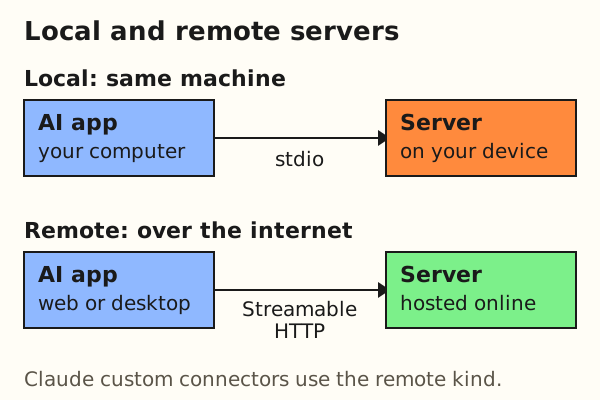
The two carry different risks. The security page says local servers "may have direct access to the user's system", and lists "arbitrary code execution" among the risks of local servers from untrusted sources. A local install asks you to trust code that runs on your machine. A remote connector asks you to trust the operator with the data you send it. Either way, look at who runs it first.
Where does Remembite fit?
Remembite is a food log your AI writes to. Your AI does the math. Remembite keeps the record. It is a remote server, and you add it to Claude as a custom connector.
- Connector URL:
https://remembite.com/mcp - Path in Claude: Customize > Connectors, then + Add, then Add custom connector. On Team plans an Owner adds it first; on Enterprise an Owner or a user with a custom role that allows it. It works in Claude and in ChatGPT (beta, via developer mode).
- Sign-in: a one-time email link, no password. A health data consent screen follows, because meal logs can reveal health information.
- The check: before saving, Remembite compares each food it can confidently match to a USDA-based reference and checks the macros against the calories. A far-off number is not saved, and your AI asks you.
- Your data: export as JSON or CSV, disconnect an AI app, withdraw consent or delete the account from the Account page.
- Not included: no photo logging, no barcode scanner, no app-store app.
Free to start. Any paid plan will be announced here before it begins. Remembite is not affiliated with Anthropic or OpenAI. The connect page has the steps with screenshots. Log meals with Claude shows a day of use. How Remembite works and the feature list cover the rest. For the research on AI food estimates, see AI food logging, explained.
FAQ
What is a nutrition MCP server?
It is a program that gives an AI app tools to log meals, look up foods and read your record back. MCP is the open standard the AI app uses to call those tools. The record lives on the server side.
Do I need Claude Code to use one?
Anthropic's custom connector article lists Claude, Cowork and Claude Desktop, adds a connector under Customize > Connectors, and does not mention Claude Code. The MCP architecture page names Claude Code as one host among several. Nutrition MCP lists Claude Code among the clients it works with, next to Claude.ai.
Is a nutrition MCP server free?
It depends on the product. As listed in October 2026: Nutrition MCP is free and open source (MIT), Ziva says it is free to use, Foodnoms MCP needs a Foodnoms+ subscription, and Remembite is free to start with any paid plan announced before it begins. Your AI plan's connector rules apply on top.
Why is my Claude connector not working?
Anthropic's article says the server "must be reachable over the public internet from Anthropic's IP ranges", so a server on a private network, behind a VPN or blocked by a firewall will not connect. To change a connector's details, remove it and add it again. A Free plan allows one custom connector. On Team plans an Owner has to add the connector first; on Enterprise an Owner or a user with a custom role that allows it.
Does it work with ChatGPT?
Nutrition MCP says ChatGPT custom apps need Developer mode, offered on some plans. Ziva lists ChatGPT. Foodnoms MCP says ChatGPT works through developer mode, depending on plan and workspace settings. Remembite works in ChatGPT in beta, through developer mode. It is not in the ChatGPT apps directory yet. Steps.
What this page cannot tell you
- We did not install or test the other servers. The table shows what four product pages say, read on 2026-10-18. It does not show whether a feature works.
- Pages change. Tool counts, prices and supported apps move. A fact here is true of the page on the day we opened it.
- Vendor pages are not independent. A product describes itself. We use them only for what the product offers, never for quality.
- We did not read every page. Ziva's privacy and terms pages and the Foodnoms privacy policy were not opened, so "not stated" is limited to the pages we read.
- The protocol changes too. The docs we cite describe protocol version 2026-07-28.
Estimates, not medical advice. How the numbers work.
Start your own record
Create a free account with your email, then add Remembite to Claude. Want to look first? Watch Claude log a sample day, no account needed.