Use case
Already logging food with an AI? Keep a record
Already ask Claude to count your macros? Keep doing that. Remembite connects to Claude and saves each meal you describe, so your totals live in one record and not in a long chat. When a number looks far off, Remembite sends a question back instead of saving it.
Get started free See Claude log a day
Free to start. Works in Claude and ChatGPT (beta).
Your chat counts well, then the totals drift
Where it loses accuracy is over time. Even when focused on just a single day, the cumulative totals can be wrong when the context window gets too large.
That is one forum commenter, not a Remembite customer, and not a measurement of any model.
What Remembite adds to a chat
Your AI does the math. Remembite keeps the record. A chat is one thread, and its totals live inside it. Remembite saves the meals your AI sends and asks first when a number looks far off.
| You need | In a chat alone | With Remembite |
|---|---|---|
| The last 30 days | Not in one place | History with charts and a Days table |
| A number that looks off | You spot it yourself | A question sent back before saving |
| Your usual meals | Retype or paste into a prompt | Saved meals and names |
Each food is labeled "Checked against USDA", "AI estimate" or "You confirmed". Remembite does not make your AI's estimates better.
How to connect Remembite to the chat you already use
1. Connect once
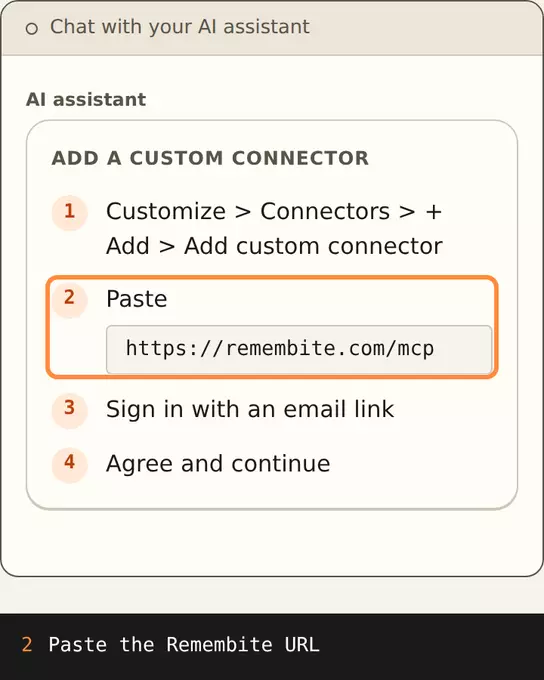
In Claude (web or desktop is the main path; once added it also shows in the iPhone app), open Customize, then Connectors, choose + Add and Add custom connector. Enter https://remembite.com/mcp, sign in with the email link (single use, 10 minutes, no password) and choose "Agree and continue" on the health data consent. Details are on the connect page.
2. Log by talking
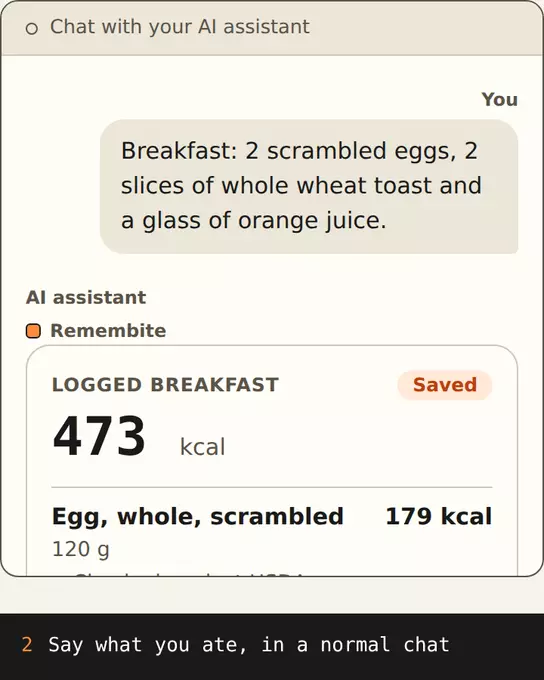
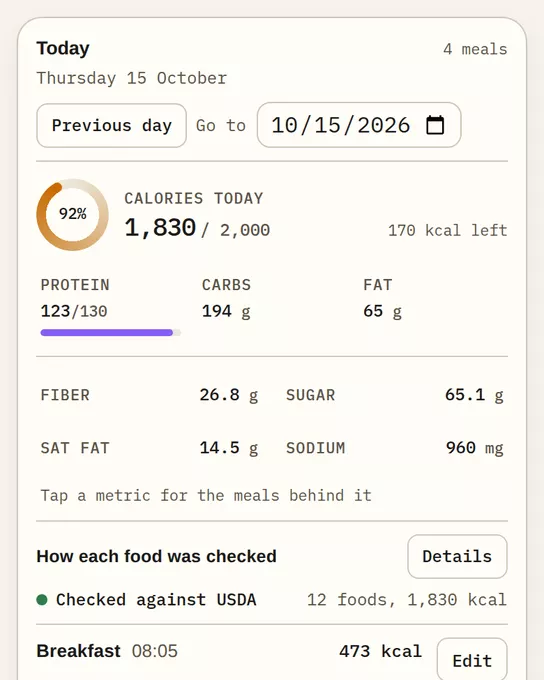
Write the meal as you do now: "Breakfast: 2 scrambled eggs, 2 slices of whole wheat toast and a glass of orange juice." Remembite saves the meal at 473 kcal and 22.3 g protein, and shows the day against the goal: 2,000 kcal and 130 g protein.
The same meal then appears in Today.
3. Get a question when a number looks far off
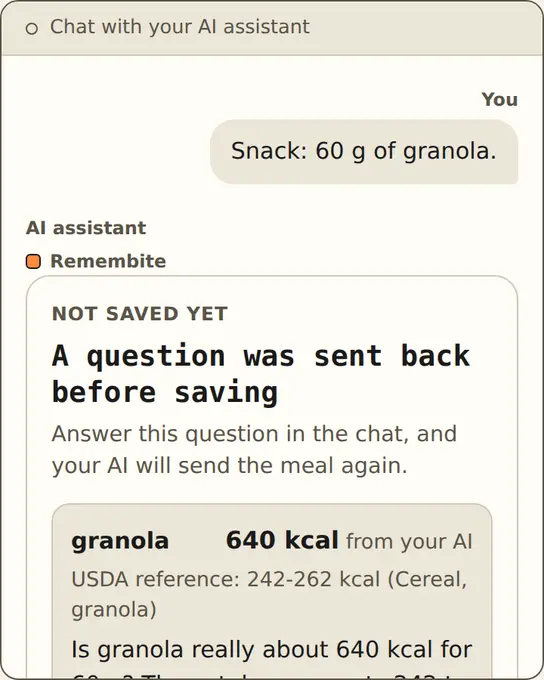
Say your AI sends 640 kcal for 60 g of granola. Remembite holds it back: "Nothing was logged", "USDA reference: 242-262 kcal (Cereal, granola)". Your AI asks you, and you fix the number or confirm it. Full flow: check before saving.
4. See the record
History shows 7, 30 or 90 days, or all time. Averages divide by the days you logged, so a day you skipped does not pull them down.
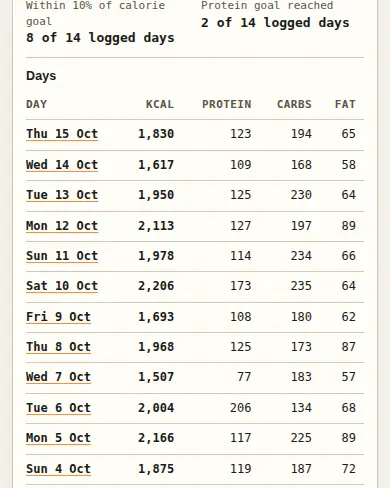
Look around first in the sample dashboard.
What Remembite does not do
- It does not fix your AI's estimates. It asks when one looks far off, and you decide.
- The check covers foods it can confidently match. Any other food is saved as your AI sent it.
- It works in Claude, and in ChatGPT (beta, via developer mode).
Not for you if a chat and a spreadsheet already work: see macro tracking without an app. Not for you if you want a barcode scanner.
Questions from people who already use an AI
Can I keep using ChatGPT?
Yes. Keep using it for estimates, and add Remembite to ChatGPT (beta, via developer mode) to keep the record. See the steps.
Will it fix my AI's wrong numbers?
No. It asks you when a number looks far off, and you decide.
Is it free?
Free to start. Any paid plan will be announced here before it begins.
Connect once, then log your next meal the way you already do.
Estimates, not medical advice. How the numbers work.
Start your own record
Create a free account with your email, then add Remembite to Claude. Want to look first? Watch Claude log a sample day, no account needed.