Claude Connector Not Working? Two Errors Explained
Claude shows two main errors when a custom connector fails: "Couldn't reach the MCP server" and "Authorization with the MCP server failed". Most causes sit on the server side, so your useful steps are short. Check that the URL is exactly what the service gave you and that your plan or admin setting allows custom connectors. Remove the connector and add it again. Then copy the reference ID that starts with ofid_ and send it to whoever runs the server.
Key takeaways
- Two messages cover most connection failures. A third, "Unexpected error while invoking tool", means the connector is connected and one tool call failed.
- Anthropic's troubleshooting page says "Couldn't reach" "isn't always a network failure", and that the page is written for the developer of the server, not for you.
- On the Free plan you can add one custom connector. On a Team plan only Owners and Primary Owners can add one.
- To change a custom connector's settings you remove it and add it again. There is no edit button.
- A server URL that redirects to a different host loses the sign-in header on the way, and Claude then reports the authorization error. Only the server's owner can tell you the right URL, and you may need to add the connector again with it.
- The
ofid_ID in the error is time limited. Copy it right after the failure.
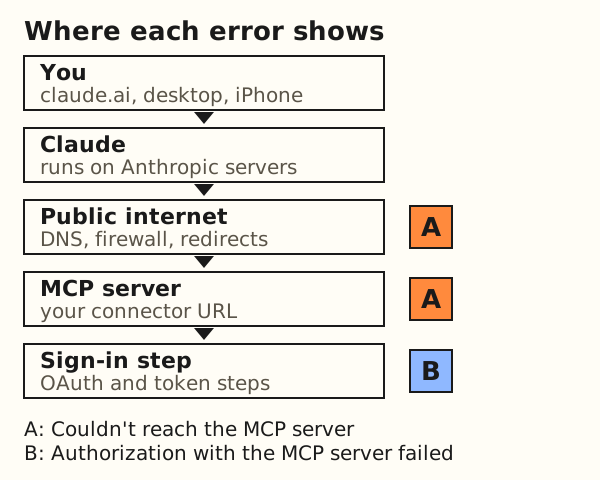
What do the two Claude connector errors mean?
A custom connector is a service you add to Claude by its URL, using the Model Context Protocol (MCP). Claude does not call it from your laptop. Anthropic's troubleshooting page says connectors on claude.ai "run on Anthropic's infrastructure and reach your server over the public internet". Many failures come from that fact, because the server has to be reachable from outside your network, not just from you.
The same page lists the messages and what they cover. It describes "Couldn't reach the MCP server" as the error shown "when Claude can't complete the connection handshake", and adds: "Despite the wording, it isn't always a network failure." It describes "Authorization with the MCP server failed" as an error that "usually appears after the OAuth flow has started". OAuth is the sign-in standard connectors use.
| Message | When it appears | Who can usually fix it | Source |
|---|---|---|---|
| Couldn't reach the MCP server | Claude cannot finish the connection handshake | The server's developer (DNS, firewall, sign-in discovery). You can check the URL you pasted. | Troubleshoot your connector |
| Authorization with the MCP server failed | The sign-in flow starts but does not finish, or the URL redirects to another host | The server's developer (sign-in setup, redirect). You can sign in again or re-add the connector. | Troubleshoot your connector |
| Unexpected error while invoking tool | The connector shows as connected, but a tool call fails | The server's developer. This error has no ofid_ ID. | Troubleshoot your connector |
The page is blunt about its audience: "This page is for the developer of the MCP server." It also says each message "covers several causes on your side", where "your" means the developer. That is why a short list of user checks follows, and a longer list of developer causes after it. The page is at claude.com/docs/connectors/building/troubleshooting.
What can you check yourself?
Five steps follow Anthropic's help, testing and troubleshooting pages. They need no developer tools.
- Plan and role. Anthropic's help page says custom connectors are available "for users on Free, Pro, Max, Team, and Enterprise plans", that "Free users are limited to one custom connector", and that "only Owners and Primary Owners can add them to Team plans". On Enterprise, the page also lists people with a custom role that includes Manage access to Libraries. If you are on Team and not an Owner, ask an Owner to add it.
- The URL, exactly as the service gives it. Paste it whole, with the path. If the service's own page lists a second address, such as one with
www.in front, use the one the service says to use. A URL that redirects to another host is a known cause of the authorization error (see the worked example below). - Remove it, then add it again. The help page says: "If you're hoping to edit a custom connector, you'll need to remove it first, then re-add it using the updated details." On web and desktop, individual Pro and Max users find connectors under Customize > Connectors. Team and Enterprise Owners use Organization settings > Connectors.
- Sign in again when Claude asks. Anthropic's testing page says a working connector shows Connected under Your connectors. If it shows Connect or Reconnect instead, "sign-in didn't finish". Finish the sign-in step, then check the status again.
- Copy the
ofid_ID. It is in the error message and in the page address. Copy it before you close the tab.
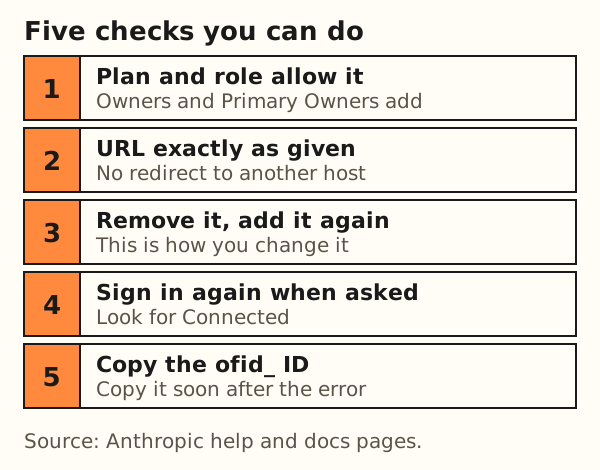
Nothing on these pages suggests turning off a browser protection, a firewall or a sign-in step. If a step asks for that, stop and ask the service provider.
What can only the server's developer fix?
When the five checks do not help, the cause is usually in the server's setup. You do not need to fix these, but knowing them tells you what to ask for. The table follows Anthropic's troubleshooting page, in plain words.
| Cause | What Claude does | Developer check |
|---|---|---|
| The hostname resolves to a private address | Rejects the connection before any request leaves Anthropic. The server's logs see nothing. | Look up the hostname from outside the network. Every address must be globally routable. |
| A firewall or bot rule blocks Anthropic | The request is stopped before the application sees it. | Look for 403 or 429 responses in edge logs. Allow Anthropic's published IP range. |
| The URL redirects to another host | Drops the sign-in header on the redirect. The target answers 401. Claude shows the authorization error. | Request the URL and read the redirect target. Register that URL. |
| Sign-in discovery data is missing | Cannot find the authorization server. Can show "Couldn't reach" even if the endpoint itself answers. | Request the discovery documents from a public network. They should return 200. |
| No way to register a client | Cannot get a client identity, so sign-in cannot start. | Offer dynamic client registration, client ID metadata documents or pre-registered credentials. |
| PKCE with S256 is not supported | The flow fails at the token endpoint. | Support S256 and advertise it in the authorization server metadata. |
| The token endpoint takes over 10 seconds | Waits up to 10 seconds for the response, then fails, even if the token is issued later. | Measure the token handler and any proxy in front of it. |
The same page lists more causes for the authorization error, such as an issuer mismatch, an audience mismatch and refresh failures. Its diagnostic checklist runs in the order Claude meets each step. One of its checks is a plain request for the redirect headers:
curl -sI https://your-server.example.com/your-mcp-path
If the response is a 3xx pointing at a different host, "that target is the URL you should register". The troubleshooting page says Anthropic's outbound requests come from a published range, which Anthropic lists on its IP addresses page. The MCP authorization specification says MCP servers "MUST implement" OAuth 2.0 Protected Resource Metadata, which is defined in RFC 9728. That metadata is what the "discovery" rows above refer to.
What is the ofid_ reference ID and who gets it?
When a connection or sign-in fails on claude.ai, Anthropic's page says "the error message and the page URL include a reference ID that starts with ofid_". The ID "lets Anthropic trace the exact failure on its side, and it's time-limited, so report soon after the failure."
Anthropic's route for a report is an issue on the anthropics/claude-ai-mcp issue tracker, with the ID, the server URL and what the server's logs show during the attempt. The page addresses developers, who can supply those logs. You cannot. So the order we suggest is this: send the ID, the exact message and the time to the service provider first. If the provider finds nothing on their side, they file the issue. If you file it yourself, the tracker is open to read without signing in, so leave out personal data and any token.
A tool-call failure is different. Anthropic says "there is no ofid_ reference ID" for it. A report for that error carries the tool name and the time of the failure in UTC.
Example: a URL that redirects to www
Worked example (hypothetical): a service tells you to add https://example.com/mcp. Nothing here is real server output. It only walks one error from message to cause.
- Message: you add the URL and press Connect. Claude shows "Authorization with the MCP server failed". It works for the developer in MCP Inspector or Claude Code.
- Cause: the server answers
301and sends clients tohttps://www.example.com/mcp. Anthropic's page explains the rest: Claude follows the redirect, drops the sign-in header, the target answers 401, and the authorization error appears. Local clients "fail fast on a redirect", and claude.ai does not, so the failure shows up later as an authorization error. - Check:
curl -sI https://example.com/mcpreturns a 3xx status and aLocationheader on thewww.host. - Fix: the developer confirms the final URL. You remove the connector and add it again with
https://www.example.com/mcp.
Anthropic's page lists the redirect among the causes of the authorization error. That makes the check in step 3 worth asking the owner to run.
This explains the common report that a connector works in MCP Inspector or Claude Code but not in claude.ai. The page also gives a second reason: "the CLI and curl connect from your machine, while claude.ai connects from Anthropic's servers." If a hostname resolves differently inside and outside a company network, claude.ai may get a private address and report "Couldn't reach".
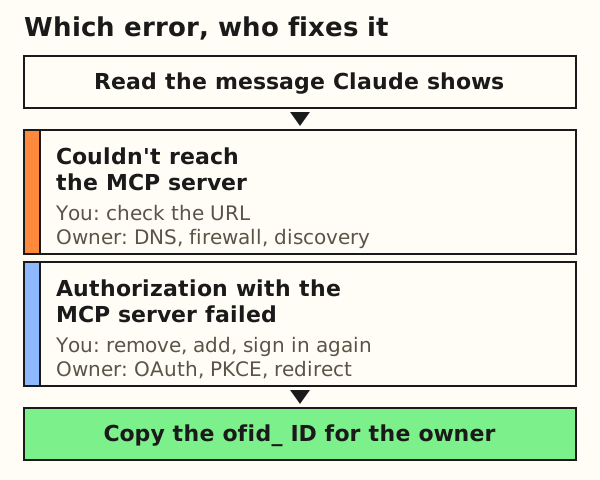
ofid_ ID going to the server's owner. Diagram by Remembite.What should you know before connecting a custom connector?
A custom connector can be any service whose owner publishes a URL. Anthropic's help page says custom connectors connect Claude to arbitrary services that Anthropic has not reviewed. It also warns: "Malicious MCP servers may include hidden instructions that try to make Claude perform unintended actions."
The page gives two habits. Review each tool approval request before you allow it: "Review Claude's tool approval requests carefully". Choose "Allow always" only for servers and tools you trust. Add a connector only when you know who runs the service and what it can do with your data. The page is at Get started with custom connectors using remote MCP.
What if it is the Remembite connector?
The Remembite connector URL is https://remembite.com/mcp. It works in Claude, including the iPhone app. It also works in ChatGPT (beta, via developer mode): ChatGPT fixes. Start with the guide that matches what you see:
- Connected, but Claude lists no Remembite tools: The Remembite connector shows no tools.
- Claude asks you to connect or authorize again: Claude asks to connect Remembite again.
- First setup, step by step: connect Remembite to Claude.
- Still stuck after those pages: Remembite support. Include the exact message and the
ofid_ID.
Your AI does the math. Remembite keeps the record. The connector is the link between the two, so for a meal-logging walkthrough read how to log meals with Claude. For how the pieces fit, read how Remembite works. For what an MCP server is, read the nutrition MCP server guide.
What does this page not cover?
- Anthropic's pages change. Every quote here was read on 2026-10-18. If a menu name or limit differs when you read this, the Anthropic page wins.
- We did not reproduce these errors. The causes come from Anthropic's pages and the MCP specification, not from our own tests.
- This page covers custom connectors. Connectors from Anthropic's directory are a separate case.
- It makes no claim about any particular server, including whether a given service is run well or kept running.
- The list of user checks is short on purpose. It holds only steps an Anthropic page supports.
Frequently asked questions
Why is my Claude custom connector not working?
Claude reaches the server from Anthropic's infrastructure, so a private address, a firewall rule, a redirect or a sign-in setup problem on the server can all stop it. Check your plan, the exact URL and whether sign-in finished, then re-add the connector and send the ofid_ ID to the server's owner.
Why does it work in Claude Code or MCP Inspector but not in Claude?
Anthropic says local tools connect from your machine and claude.ai connects from Anthropic's servers. A hostname that resolves differently outside your network, or a URL that redirects to another host, shows up only in claude.ai.
What is the ofid_ ID in the error?
It is a reference ID in the error message and page URL that lets Anthropic trace a failed connection. It is time limited, so copy it soon after the failure and give it to the service provider.
Do I need a paid plan to add a custom connector?
Anthropic's help page, read on 2026-10-18, lists Free, Pro, Max, Team and Enterprise plans. Free is limited to one custom connector. Plan rules can change, so check the page.
Why can't I add a connector on a Team plan?
The help page says only Owners and Primary Owners can add custom connectors to Team plans. Ask an Owner to add it under Organization settings > Connectors.
Estimates, not medical advice. How the numbers work.
Start your own record
Create a free account with your email, then add Remembite to Claude. Want to look first? Watch Claude log a sample day, no account needed.