How to Track Water Intake With Claude
You can track water intake with Claude by connecting Remembite and saying what you drank, for example "I drank 500 ml of water." Claude sends the amount and unit to the log_water tool, Remembite saves one plain-water entry in ml, and you can ask Claude for the day's total at any time.
Key takeaways
- Four units work: ml, l, fl oz and cups. One cup is saved as 240 ml, and 16 fl oz is saved as 473 ml.
- One entry holds 1 ml to 10,000 ml. Glass, bottle and a plain "oz" are not accepted, so Claude asks you for the amount in ml.
- Only plain water counts toward the water total. Milk, juice and coffee go in as meals.
- A daily water goal is optional, from 1 ml to 20,000 ml, and you set the number yourself. Remembite has no default goal and sends no reminders.
delete_waterremoves one entry for good. There is no edit: delete the entry and log it again.- Water logs are treated as health data, so Remembite asks for your consent before it saves any.
How do you track water intake with Claude?
You connect Remembite once, then tell Claude what you drank in plain words. Four steps:
- Add Remembite as a custom connector in Claude (web, desktop or the iPhone app). The connect page has the connector URL and the steps. In Anthropic's custom connectors help page the path, for any Claude plan, is Customize > Connectors > + Add > Add custom connector, and on Team and Enterprise plans an organization Owner adds it first.
- Accept the health data notice when it appears. New accounts see it once, at connection.
- Tell Claude what you drank: "I drank 500 ml of water."
- Ask for the day: "How much water have I logged today?"
Remembite gives Claude two water tools: log_water and delete_water. You never call them by name. Claude, not Remembite, turns your words into an amount and a unit. Remembite converts the unit to ml and saves the entry. The tools reference lists all 23 tools, and logging meals with Claude covers the meal side.
You can also say when you drank: "I had 300 ml of water at 9 am." The tool takes an optional time with a UTC offset and uses the current time when you give none.
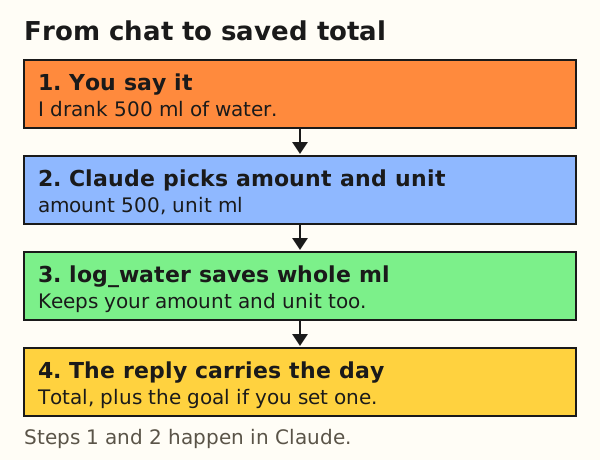
Which units can you log water in?
Four: ml, l, fl oz and cup (the word "cups" also works). Remembite converts each one to whole ml and keeps the amount and unit you gave next to it.
| You say | Unit Claude sends | Saved as (ml) |
|---|---|---|
| 500 ml | ml | 500 |
| 1 l | l | 1,000 |
| 16 fl oz | fl_oz | 473 |
| 1 cup | cup | 240 |
| 2 cups | cup | 480 |
The unit is read without regard to case, and spaces or hyphens count as an underscore, so "fl oz" and "fl-oz" both work. The 16 fl oz row is 16 x 29.5735 = 473.176, rounded to 473 ml.
Any other unit, such as a glass, a bottle or a plain "oz", is refused because it has no fixed size. The refusal reads like "Not saved. A glass is not a fixed size, so Remembite needs the amount in ml, L, fl oz or cups." The tool text tells Claude to ask you for the amount in ml. Nothing is saved until you answer.
Why is 1 cup 240 ml and 16 fl oz 473 ml?
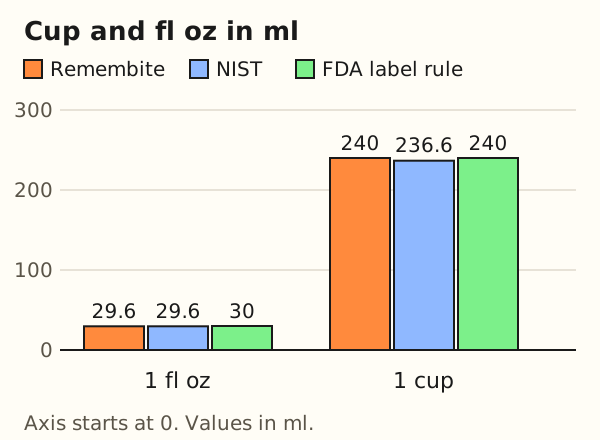
Remembite uses 240 ml for one cup and 29.5735 ml for one US fluid ounce. The cup matches the US nutrition labeling rule. The ounce matches the NIST value. A US customary cup is slightly smaller, at 236.588 ml.
| Standard | 1 cup (ml) | 1 fl oz (ml) | 8 cups (ml) |
|---|---|---|---|
| Remembite | 240 | 29.5735 | 1,920 |
| US labeling rule (FDA) | 240 | 30 | 1,920 |
| NIST, US customary | 236.588 | 29.5735 | 1,892.7 |
The 8-cup column is arithmetic: 8 x 240 = 1,920 and 8 x 236.588 = 1,892.7. Against the NIST cup, 8 cups in Remembite come to 27.3 ml more, which is 1.4 percent of 1,892.7 ml.
The FDA rule in 21 CFR 101.9 says "a cup means 240 mL, 1 fl oz means 30 mL" for nutrition labeling. It rounds the ounce to 30 ml, and Remembite does not. The NIST conversion table lists 29.57353 ml for a US fluid ounce and 236.5882 ml for a US cup. This page does not call either cup size right. It states which one Remembite stores. If your cups are another size, say the amount in ml.
What counts as water, and what does not?
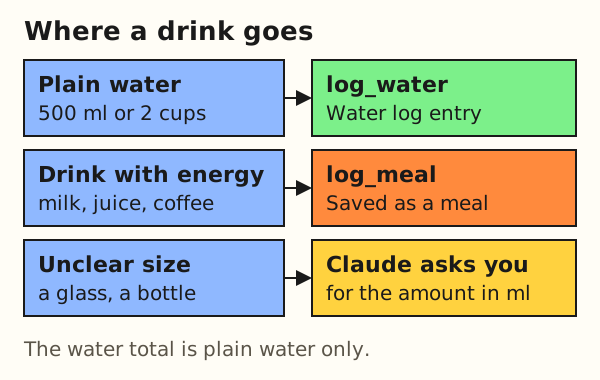
Only plain water counts. The tool description tells Claude to send drinks with energy, such as milk, juice or coffee, to log_meal instead.
| You say | What Claude does | Where it is saved |
|---|---|---|
| "I drank 500 ml of water" | Calls log_water | Water log |
| "A glass of water" | Asks for the amount in ml | Nothing until you answer |
| "A latte" or "a glass of milk" | Calls log_meal | Meal log, not the water total |
| "Delete that last water entry" | Calls delete_water with the entry id | Removed for good |
Remembite does not guess water from soup, fruit or any other food. The server also cannot see what Claude decides: the routing in the middle column comes from the tool descriptions, and Claude makes each call.
What does a day of water entries add up to?
Worked example: a hypothetical day with three entries. You say "a 250 ml glass", "a 16 fl oz bottle" and "2 cups".
- The glass: you give the ml, so it is saved as
250 ml x 1 = 250 ml. - The bottle:
16 x 29.5735 = 473.2, saved as 473 ml. - The cups:
2 x 240 = 480ml. - The day:
250 + 473 + 480 = 1,203ml.
If you had set a goal of 2,000 ml yourself (hypothetical), the tool result for the last entry reads "Logged 480 ml of water. Total: 1,203 ml on 2026-10-25 (goal 2,000 ml)." The goal appears beside the total. The result gives no percentage and no comment on the number.
How do you set a water goal?
A water goal is optional and empty until you set one. Say it in Claude: "Set my water goal to 2,000 ml."
- The goal is a whole number of ml from 1 to 20,000.
- Water is a separate number. Setting it leaves your calorie and macro goals as they are.
- To clear it, ask Claude to remove your water goal. Only that goal is cleared. At least one goal must remain set, so if water is your only goal, set another one first.
- Goals start today unless you give a date.
Remembite suggests no goal and sends no reminder. The goals guide covers the Goals page in the app.
Where do you see your water total?
In chat, ask Claude. In the web app, open Today, History or Goals.
- Today in chat:
get_dayreturns the day's water total and each entry. - A range in chat:
get_historyreturns the water total per day for up to 31 days.get_summaryreturns the number of days with water logged and the average on those days, for up to 92 days. - In the app at app.remembite.com: Today shows the day's total and each entry, History charts water per day, and Goals holds the optional goal. The changelog has the release note.
How do you fix or delete a water entry?
delete_water deletes one entry by its id, for good. Claude finds the id in the result of the log call or in the day's list. An unknown id returns "Water entry not found."
There is no edit tool for water. To change an amount, ask Claude to delete the entry and log the right one.
The log tool also accepts an idempotency key. If the same request arrives twice with the same key, Remembite returns the entry it already saved instead of adding a second one.
Why does Remembite ask for consent before saving water?
Water logs are treated as health data, so Remembite asks first. New users accept the health data notice once, when they connect.
If you agreed before water was added on 2026-10-18, your meals, goals and history keep working. The first time you log water, log_water saves nothing and the result tells you to open the app at app.remembite.com and accept the updated notice. Then you ask again.
You stay in control of the data. The JSON export includes water entries, the CSV export covers meals only, you can withdraw consent, and deleting your account deletes the water entries with it. The health data privacy page and the privacy policy hold the full text.
What does water tracking not do?
It is a log you fill by talking to Claude, and that sets its limits.
- No reminders and no notifications.
- No sync with bottles, watches or other devices.
- No advice on amounts and no default goal.
- One entry holds 1 ml to 10,000 ml. Remembite checks the range and the unit. It saves the amount Claude sends and cannot know whether you drank it.
- Unusual units need an amount in ml.
- No edit: delete and log again.
- ChatGPT (beta): we tested meals only. Water logging in ChatGPT is not tested yet.
This page follows the Remembite code and docs as of 2026-10-18, and details can change.
FAQ
Can Claude track how much water I drink?
Yes, with the Remembite connector. Claude saves plain water in ml and reads the day's total back when you ask.
Can I log water in cups or fluid ounces?
Yes. One cup is saved as 240 ml, and fluid ounces are converted at 29.5735 ml each.
Does coffee, milk or juice count as water?
No. Log drinks with energy as meals. The water total is plain water only.
Can I log water with ChatGPT?
Remembite works in ChatGPT (beta, via developer mode), and the same server has the water tools. We have tested meals in ChatGPT, not water yet.
How do I delete a water entry?
Ask Claude to delete it. delete_water removes the entry for good, and there is no edit.
Does Remembite tell me how much water to drink?
No. Remembite gives no amounts and sends no reminders. A water goal is a number you set yourself.
Estimates, not medical advice. How the numbers work.
Start your own record
Create a free account with your email, then add Remembite to Claude. Want to look first? Watch Claude log a sample day, no account needed.